Print businesses are being asked to do more online: sell increasingly complex products, handle more customer artwork, shorten production cycles, and give customers an easier way to create and approve designs.
DesignO 2.8 is built around those challenges.
The latest
DesignO release brings 8 major feature areas, 23 improvements, and a range of additional fixes, with new capabilities across production automation, complex product configuration, artwork management, print quality, AI-powered design, and eCommerce.
This release is about more than adding features to the DesignO editor. It gives print businesses more ways to sell complex products, move orders toward production faster, reduce artwork-related back-and-forth, and deliver a better customer design experience.
Here’s what’s new.
DesignO 2.8 at a Glance
What’s new | What it means for your business |
|---|
AI Design Suite | Give customers more AI-assisted design capabilities without leaving DesignO |
Job Automation | Reduce manual steps between order and production |
Artwork Versioning & Approval | Keep artwork revisions and approvals organized |
3D Preview + Materials | Help customers visualize configurable products |
Variable Page Sizes | Sell complex multi-part products as one product |
ICC Profile Management | Improve colour consistency in professional print workflows |
Design Studio Action Configuration | Adapt the design experience to different business models |
External SVG Import | Bring professional artwork into DesignO without rebuilding it |
These eight areas represent the major functional themes of the 2.8 release.
1. Automate the Journey from Order to Production
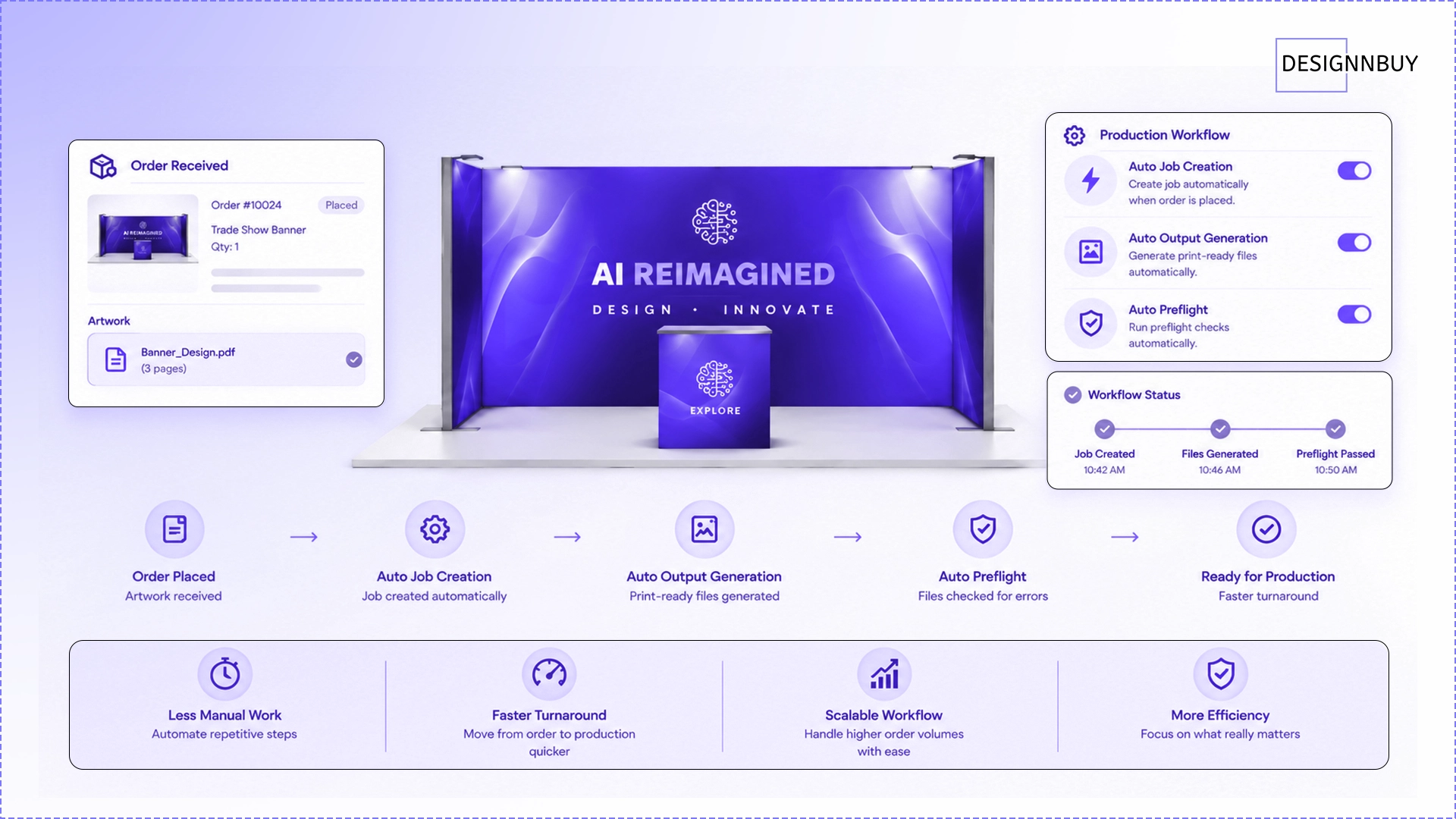
For high-volume printers, even a few manual production steps can quickly become a bottleneck.
DesignO 2.8 introduces three automation controls that can help move orders through the production workflow with less manual intervention:
Auto Job Creation
Auto Output Generation
Auto Preflight
When enabled, these steps can trigger automatically when an order is placed or artwork is updated. Each automation can be configured independently, allowing businesses to automate the parts of their workflow that make the most sense for them.
Why it matters
Instead of manually moving every order through the workflow, DesignO can take care of repetitive production steps automatically.
That means less manual work, faster movement from order to production, and a workflow that can scale as order volumes grow.
Best for: High-volume printers, trade printers, production-heavy businesses, and merchants with repetitive order processing.
2. Keep Every Artwork Version and Approval in One Place
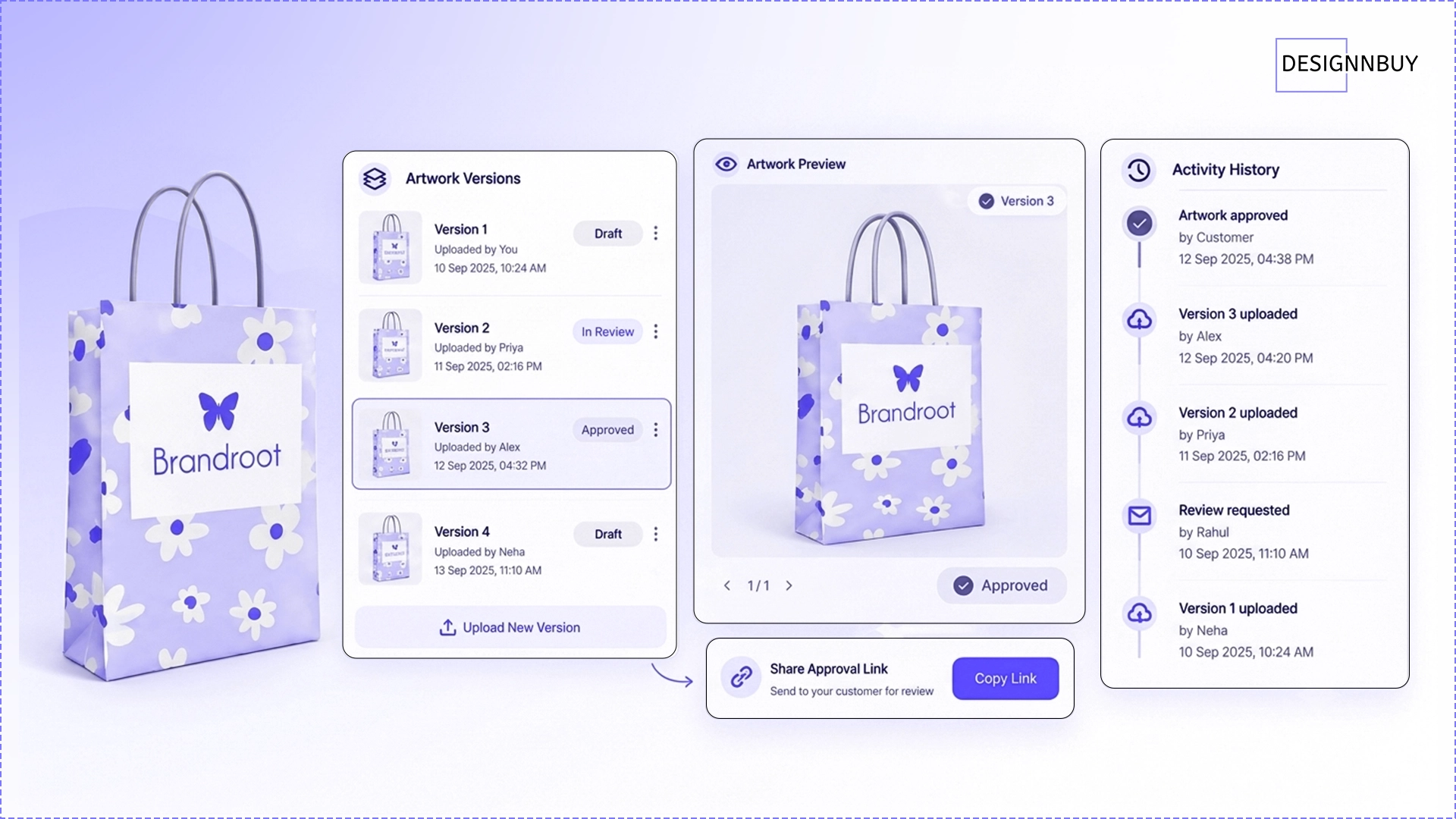
Artwork revisions can quickly become difficult to track.
A customer sends one version by email. Someone makes a change. Another version gets uploaded. Then someone has to figure out which file was actually approved.
DesignO 2.8 brings more of that process directly into the order workflow.
Each order item can maintain artwork versions, while customers or admins can review and approve artwork through a share link. PDF artwork, including multi-page PDFs, can also be uploaded, and the order maintains an activity history.
Why it matters
Approvals become part of the order rather than a separate email conversation.
This helps teams achieve:
Better artwork traceability
Clearer customer approvals
Fewer misunderstandings
Easier resolution of artwork disputes
Less back-and-forth between customers and production teams
Best for: Printers handling client-supplied artwork, proofing workflows, custom orders, corporate printing, and teams where multiple people work on the same order.
3. Give Configurable Products a More Realistic 3D Experience
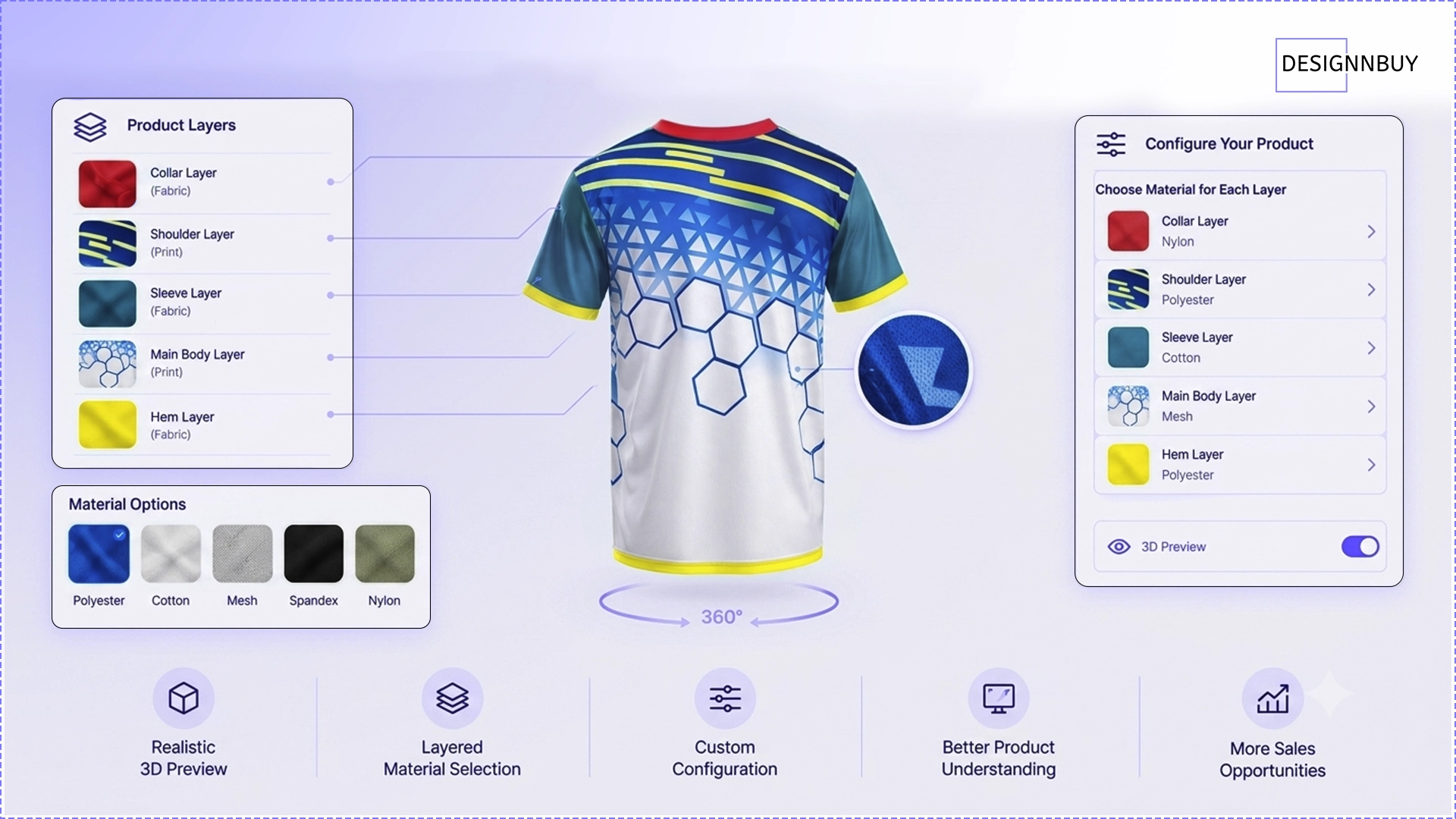
Complex products can be difficult to explain with a flat design canvas alone.
DesignO 2.8 expands configurable-product capabilities with materials for product layers and
3D preview.
Merchants can define material choices for product layers, while customers can select configured materials during the design experience and see a more realistic representation of the product before ordering.
Why it matters
Customers can better understand what they're configuring before they place an order.
That makes complex products easier to sell and creates new opportunities for businesses offering layered or configurable products.
Best for: Custom merchandise, workwear, layered products, and other configurable products.
4. Sell Multi-Part Products as One Product with Variable Page Sizes

Some products simply don't fit into a one-size-per-product model.
A booth might have panels with different dimensions. A display product may contain multiple surfaces. A mixed-format printed product may require different page sizes within the same product.
Previously, DesignO did not support different dimensions for pages within a single product. DesignO 2.8 changes that.
A product can now have different page dimensions, with the design experience and output respecting the configured size for each page.
What this opens up
Display products
Signage
Booth and exhibition products
Canopies and tents
Mixed-format print products
Products with multiple differently sized pages
Why it matters
Instead of forcing customers to order several separate products, businesses can offer a complex multi-part product as one configurable product.
For display, exhibition, and signage businesses, that can make previously difficult product configurations much easier to sell online.
5. Improve Colour Consistency with ICC Profile Management
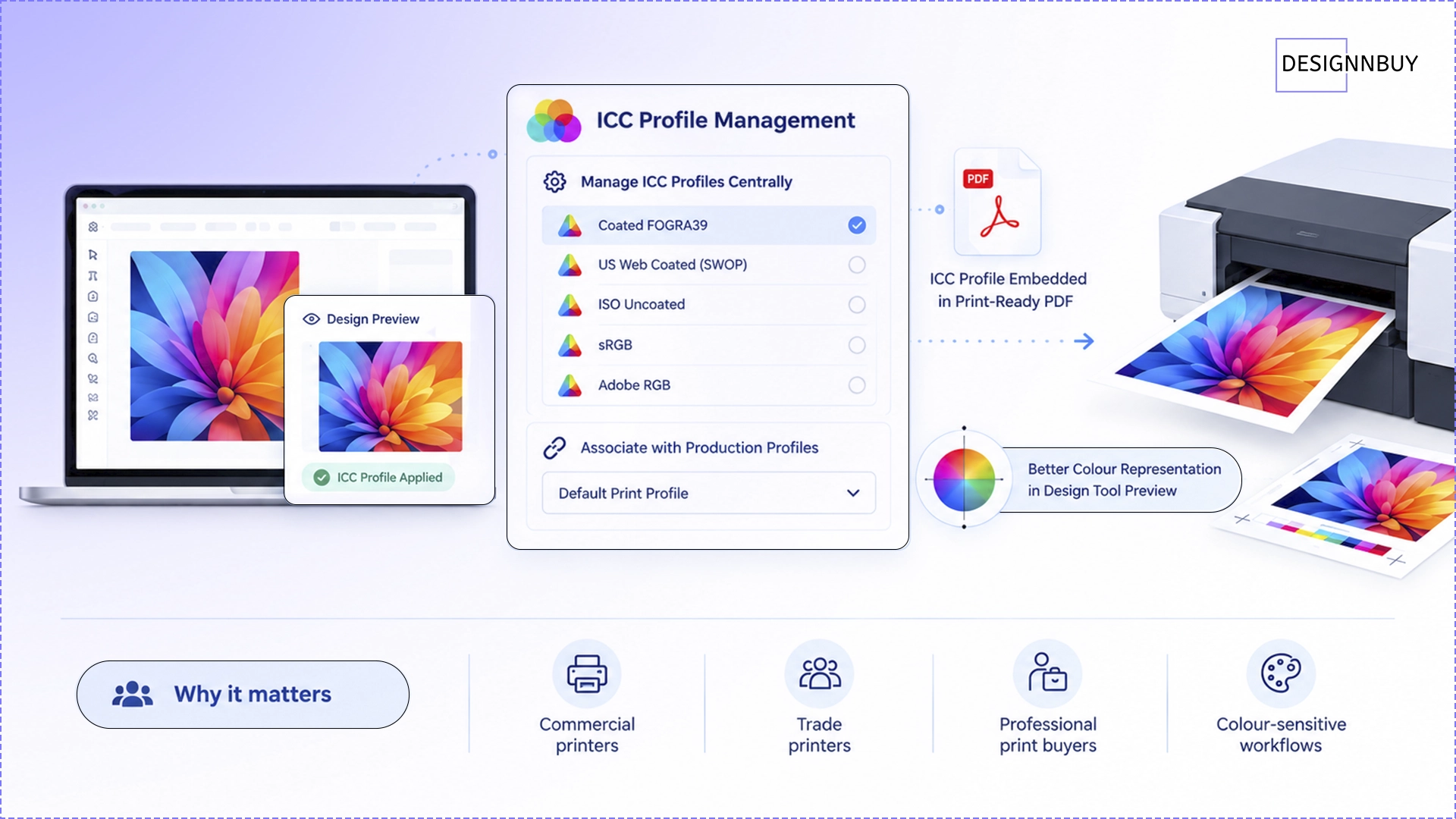
For professional printers, getting the design right is only part of the job.
The output also needs to behave correctly through the print workflow.
DesignO 2.8 introduces ICC Profile Management, allowing admins to manage ICC profiles centrally and associate them with production profiles. The assigned profile is embedded into applicable print-ready PDF output, while the design-tool preview provides better representation of uploaded artwork.
Why it matters
This gives professional and trade printers greater control over colour consistency from design review through to print-ready output.
Best for: Commercial printers, trade printers, professional print buyers, and colour-sensitive workflows.
6. Run DesignO as a Brand Portal, Not Just a Storefront
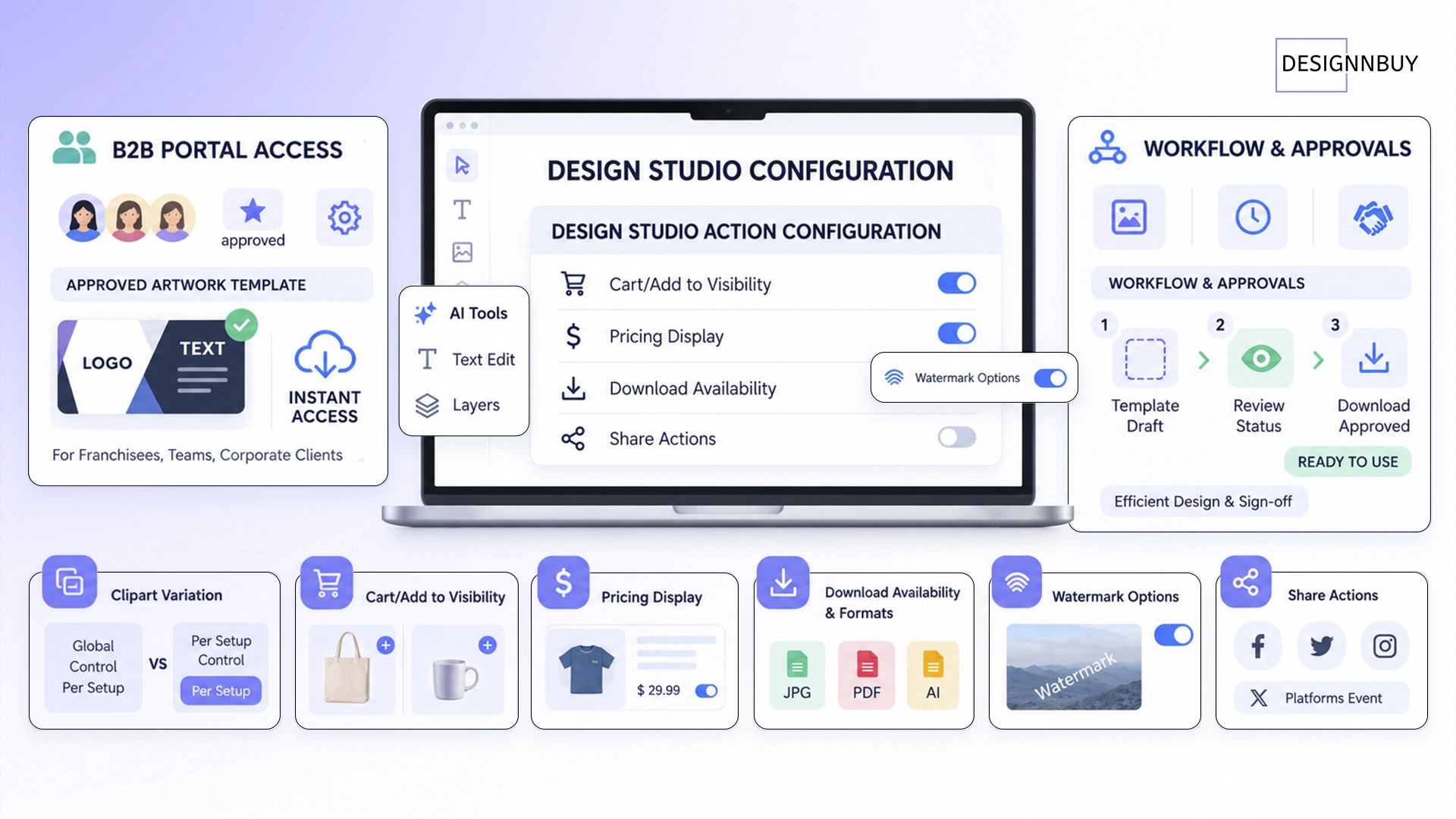
DesignO doesn't have to be limited to a traditional eCommerce journey.
A print business can use DesignO to power a brand portal where a corporate client's employees, internal teams, or franchisees access approved, on-brand artwork — without needing to go through a shopping cart.
The same DesignO setup can also support client artwork portals, approval workflows, or other non-traditional design experiences. Each of these use cases can require a different set of actions. A brand portal, for example, may not need Add to Cart, pricing, or checkout at all. Instead, the focus may be on creating or downloading approved artwork.
With Design Studio Action Configuration in DesignO 2.8, admins can control which customer-facing actions are available for each Design Studio setup. This includes:
Cart and Add to Cart visibility
Pricing display
Download availability and permitted file formats
Watermark options
Share actions
Why it matters
The key is that these settings are configured per Design Studio setup, not globally.
That means a print business can run its public eCommerce storefront and a dedicated corporate brand portal side by side, with each providing a completely different customer experience.
For example:
Public storefront: Customers can design, see pricing, add products to cart, and place an order.
Corporate brand portal: Employees or franchisees can access approved templates, create branded artwork, and download files — without seeing a cart or going through checkout.
This gives businesses the flexibility to use DesignO for more than selling print online. It can be configured around the way the business operates, whether that's eCommerce, B2B, brand management, artwork approval, or a combination of workflows.
Best for: Corporate brand portals, franchise networks, B2B workflows, artwork portals, internal design teams, approval workflows, and eCommerce businesses that need different Design Studio experiences.
7. Bring AI-Powered Design Capabilities into DesignO
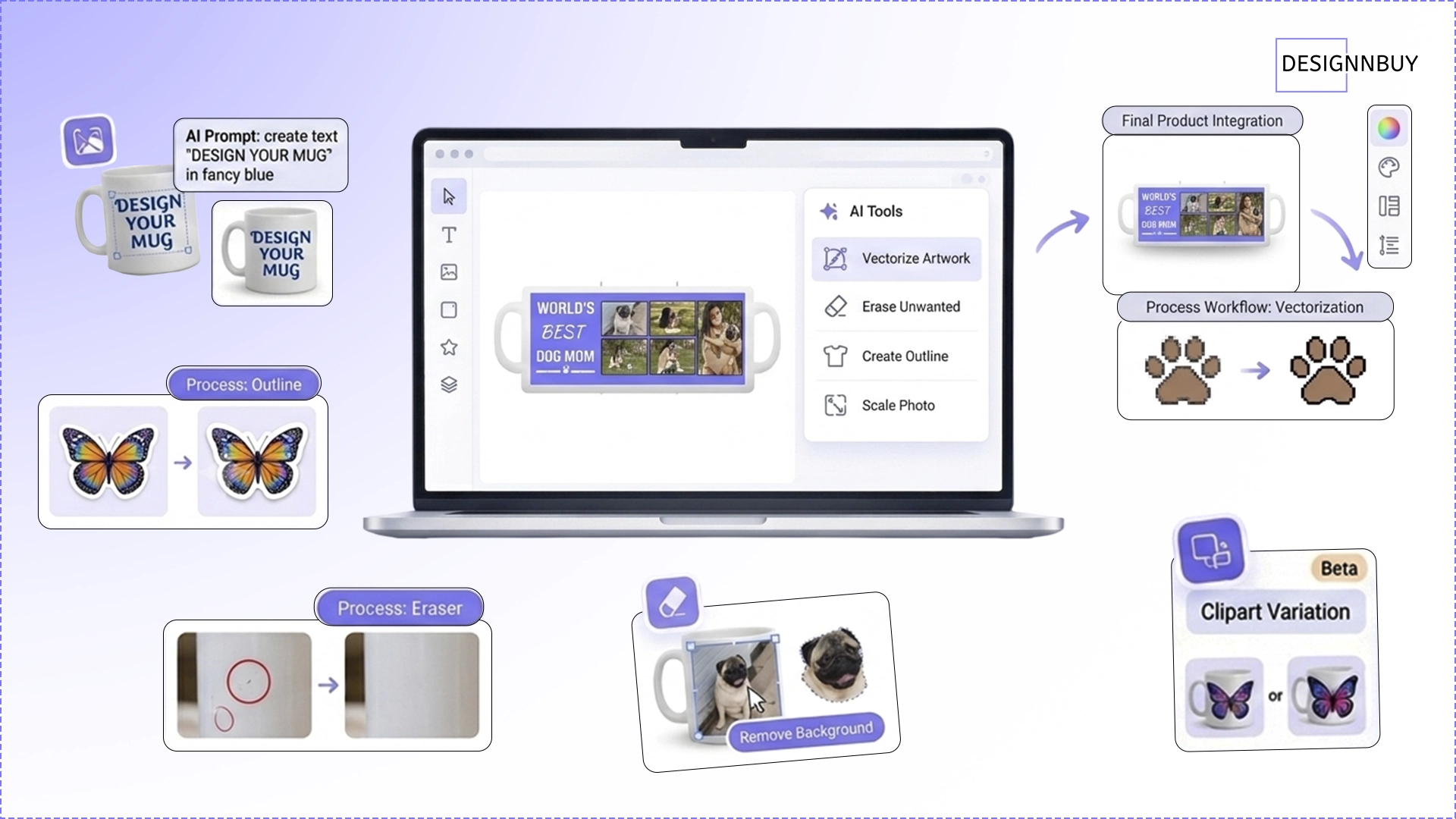
AI is becoming part of the modern design workflow. With DesignO 2.8, customers can access more AI-assisted capabilities directly inside the Design Studio, while merchants retain control over which tools they make available.
The expanded AI Design Suite now includes 12 capabilities, covering tasks such as:
Template Variation
Clipart Variation
Artwork Variation
Remove Background
Face Cutout
Text Translation
Image Upscaler
Image Vectorization
AI Eraser
Outline Generation
What the new AI tools add
Image Vectorization helps turn raster artwork into scalable vector artwork directly within the design workflow.
AI Eraser helps remove unwanted elements from an image without requiring the customer to leave DesignO for another editing tool.
Outline Generation can automatically create outlines around selected artwork, which can be especially useful for applications such as stickers and die-cut work.
Why it matters
Customers can accomplish more common artwork tasks without constantly switching to external design software.
For merchants, that means a richer self-service personalization experience and more opportunities to differentiate their storefront.
Best for: Promotional products, personalized products, merchandise businesses, and businesses focused on self-service customization.
DesignO gives admins control over feature visibility, making it possible to introduce these capabilities at their own pace.
8. Bring Professional SVG Artwork Directly into DesignO
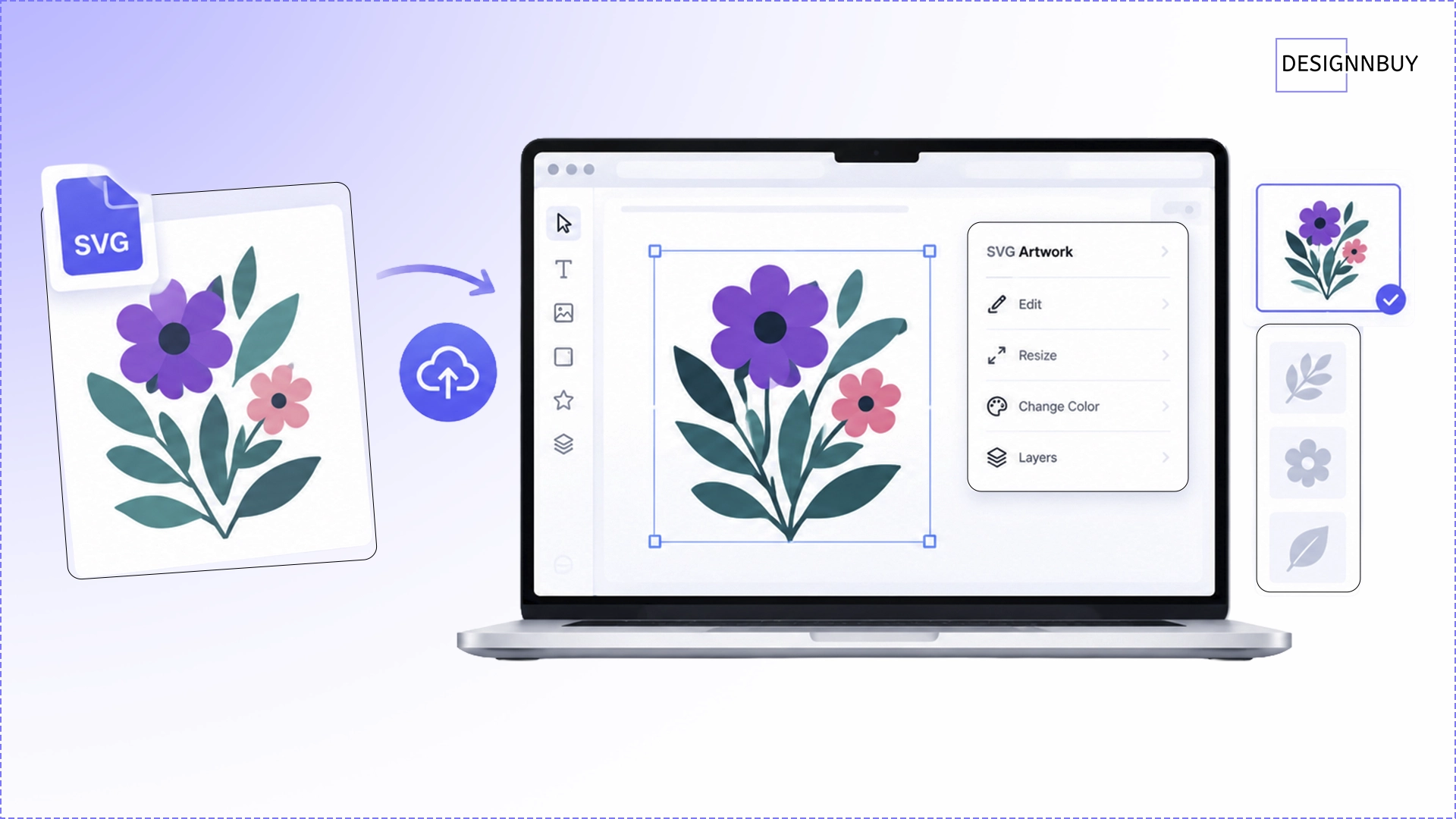
Professional artwork is often created outside the web-to-print platform.
When that artwork has to be recreated manually inside the editor, valuable production and setup time can be lost.
DesignO 2.8 adds External SVG Import, allowing externally created SVG artwork to be brought into the template editor and used as editable artwork.
Why it matters
Design teams and printers can reuse artwork created in professional design environments instead of rebuilding it from scratch.
This makes DesignO easier to fit into existing creative workflows and is particularly useful when businesses already have libraries of professional artwork.
Best for: Agencies, professional design teams, printers receiving client artwork, and businesses with existing SVG libraries.
Better eCommerce Experiences, Too
These aren't necessarily the headline features of the release, but they make everyday workflows cleaner and more reliable.
These are not new features. They make the platform behave better for merchants already running DesignO with a storefront.
Platform | What changed | What you'll notice |
|---|
| Product and related artwork are consolidated into one line item | Cleaner order review |
| Product and related artwork are consolidated into one line item | Easier order management |
| Improvements to custom-size rendering, swatches, image option dropdowns, and configurable-product pricing | More reliable product configuration |
| Updated/tested with the default theme and improved centralized error handling | More predictable behaviour and clearer error feedback |
These improvements are particularly valuable for existing DesignO customers because they focus on making storefront and order-management experiences more predictable.
Which DesignO 2.8 Feature Is Right for Your Business?
The easiest way to understand the release is to start with the problem you're trying to solve.
If you're a... | Start with... |
|---|
High-volume printer | Job Automation |
Display or exhibition printer | Variable Page Sizes |
Custom merchandise / workwear business | 3D Preview + Materials |
Professional or trade printer | ICC Profile Management |
Printer handling client artwork | Artwork Versioning + Approval |
Brand or artwork portal | Design Studio Action Configuration |
AI-powered personalization business | AI Design Suite |
DesignO 2.8: Built Around the Complete Print Journey
DesignO 2.8 isn't just about adding more features to the editor.
It's about connecting more of the journey:
Configure a complex product → Create and approve artwork → Automate production → Generate reliable output → Deliver a better customer experience.
Whether the goal is to sell a booth with multiple dimensions, automate repetitive production tasks, keep artwork approvals organized, improve colour consistency, reuse professional artwork, or give customers more creative tools, DesignO 2.8 gives print businesses more control over the process.
That's the real story of DesignO 2.8: more flexibility for what you sell, more control over how you produce it, and a smarter experience for the customers who design with you.
For Existing Users: If you want to get DesignO 2.8 implemented on your dashboard -
please contact us.