How to start a printing business from home in 2026
You can start a printing business from home with a small budget, the right printer, and an online store. This guide explains the costs, equipment, and steps needed to launch in 2026.
 Nidhi Agarwal
Blog article content
The short answer: You can start a printing business from home with as little as $1,000 to $5,000, a focused niche, the right printer for your products, and an online web to print storefront. Most home-based print businesses begin making their first sales within 30 to 60 days of setup.
Now, let’s get into the full picture.
Why So Many People Are Starting a Printing Business from Home Right Now
You are not alone thinking about this.
More people than ever are looking to start a printing business from home because the barriers are genuinely low. You do not need a commercial space. You do not need a team. And you do not need to invest in huge industrial machines on day one.
Here is what the numbers say: home-based businesses in the US generate around $427 billion annually, and 44% of them start with under $5,000. The print industry is also on a strong growth path – the global custom printing market was valued at $38.1 billion in 2024 and is projected to reach $68.46 billion by 2030, growing at a 10.3% annual rate.
Now, here’s where it gets interesting.
Today, tools like web to print software let even a solo home-based printer take orders online, let customers design their own products, and automatically generate print-ready files. That means you spend more time printing and less time going back and forth over artwork.
In this guide, you will learn exactly how to start a printing business from scratch, step by step, with up-to-date advice for 2026.
Who Can Start a Printing Business from Home?
Let me break it down.
You do not need a design degree or years of printing experience. Here are the types of people who do well in this space:
Graphic designers who want to sell their designs as physical products rather than just charging hourly rates. A home print setup turns your design skills into a product business.
Creative individuals and stay-at-home parents who want a flexible income source. Starting small with a heat press or DTG printer and selling custom apparel or gifts is a great fit.
Small entrepreneurs who already run an online store and want to add custom printed merchandise without outsourcing every order.
Anyone who wants to be their own boss and is willing to put in the work to build something from the ground up.
Now you might be wondering: do I need prior printing experience? Not at all. Most modern printing equipment is designed to be accessible. And there is a large community of printers online who share advice freely.
Step-by-Step: How to Start a Printing Business from Home
Step 1: Do Your Market Research and Write a Simple Business Plan
Before you buy a single machine, spend time understanding the market.
Ask yourself: Who are my ideal customers? Are they local businesses that need flyers and business cards? Parents who want custom birthday party supplies? Corporate clients who want branded merchandise?
Once you know who you are serving, look at what your competitors are charging, which products sell the most in your niche, and what gaps you can fill. You do not need a 40-page document. A simple one-page business plan covering your niche, target customers, pricing approach, and initial product list is enough to start.
Here is the kicker: most people who start a printing business from home skip this step and end up buying equipment that does not match their market. Do not do that.
Step 2: Pick a Focused Printing Niche
 One of the biggest mistakes new home printers make is trying to sell everything to everyone. That approach spreads your investment thin and makes it hard to build any reputation.
Instead, pick one or two product categories and go deep.
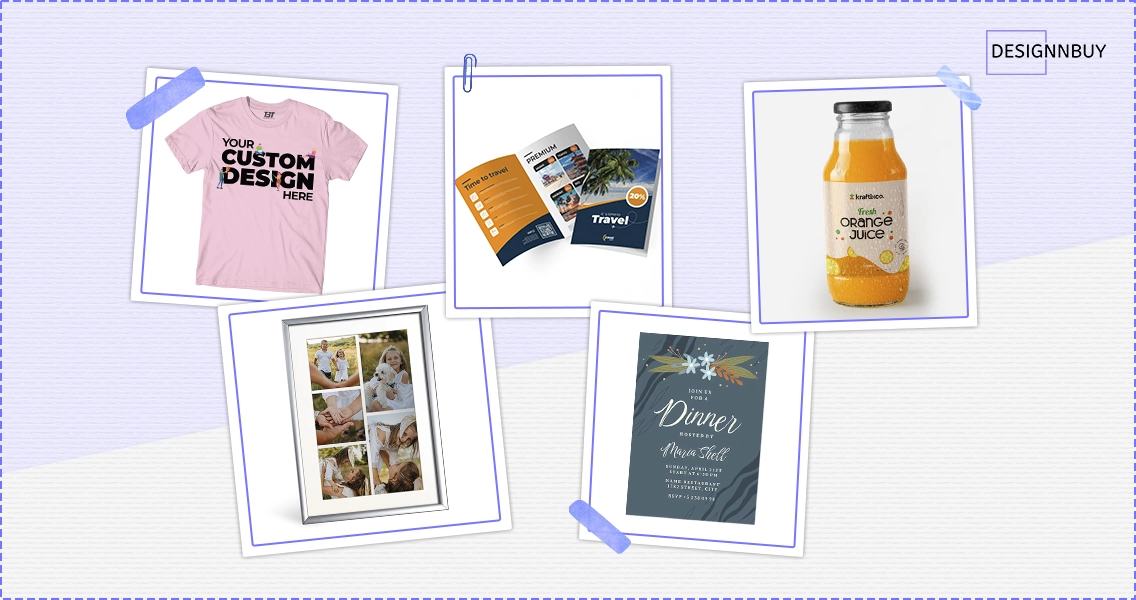
Some of the strongest niches for home-based print businesses in 2026 include:
Custom apparel (t-shirts, hoodies, tote bags) using DTG or heat transfer printing. The custom apparel market alone is expected to hit $10 billion by 2025 and is still growing.
Personalized gifts and home decor such as mugs, photo frames, canvas prints, and phone covers. These sell consistently throughout the year and spike during holidays.
Business stationery and marketing materials including business cards, flyers, brochures, and branded packaging. Local small businesses are a reliable source of repeat orders.
Stickers, labels, and decals for product packaging, small businesses, and personal use. Waterproof stickers in custom shapes are especially popular on platforms like Etsy.
Wedding and event stationery such as invitations, menus, table numbers, and thank-you cards. This is a premium market where customers are willing to pay more for quality.
Let me show you what I mean with a real example. One home printer we know started with only custom stickers and labels, selling to small food and cosmetic brands on Etsy. Within a year, they had enough regular clients to move into a dedicated home workshop and add a second product line. The focus is on what made it work.
Step 3: Choose the Right Printing Equipment
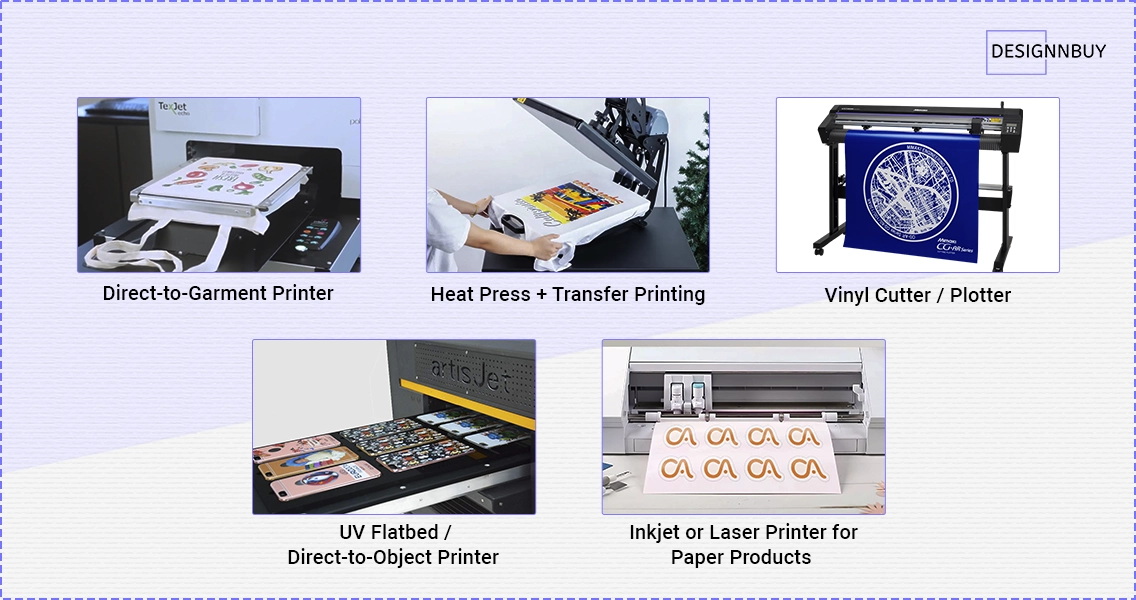
This is where most beginners overthink things. Let’s go through the main options clearly.
Direct-to-Garment (DTG) Printer
Best for: Custom t-shirts, hoodies, baby clothes, tote bags, and other fabric products.
A DTG printer works similarly to a regular inkjet but prints directly onto fabric. You can produce full-color, photo-quality prints with no minimum order size, which is ideal for print-on-demand. Entry-level models start around $10,000 to $15,000, though more affordable options are available for lower volumes.
At roughly 10 pieces per hour, custom t-shirts can bring in around $200 or more in hourly profit depending on your pricing.
Heat Press + Transfer Printing
Best for: Apparel, hats, tote bags, mugs, water bottles, and other hard goods.
A heat press is one of the most accessible ways to start a printing business from home. A good quality press starts at around $300 to $500. You print your design on transfer paper using a regular inkjet or laser printer, then apply it using heat and pressure. For mugs and curved surfaces, a mug press works the same way.
This setup is a great starting point because the upfront cost is low and the product range is wide.
Vinyl Cutter / Plotter
Best for: Stickers, decals, signage, window graphics, vehicle wraps, and HTV for apparel.
A vinyl cutter traces and cuts designs out of adhesive vinyl sheets. Popular brands like Cricut and Silhouette are well-suited for home use. These machines start at under $500 for beginner models. Combined with a design tool, they are perfect for producing stickers, labels, and custom decals.
UV Flatbed / Direct-to-Object Printer
Best for: Phone cases, tumblers, plaques, awards, glassware, and other hard objects.
These printers apply UV-curable ink directly onto almost any flat surface. Smaller desktop models are available for home use, though they come at a higher cost. If you want to offer a wide range of custom gifts and promotional items, this is worth exploring as a second printer.
Inkjet or Laser Printer for Paper Products
Best for: Business cards, flyers, brochures, invitations, and other paper-based products.
If your niche is paper products, a high-quality inkjet or laser printer is your core tool. Professional-grade printers from brands like Epson or Canon can produce stunning results at a fraction of commercial print shop costs.
Quick tip: Whatever equipment you buy, check whether it requires special inks, substrates, or maintenance contracts. Factor these into your cost calculations before purchasing.
Step 4: Set Up Your Home Workspace
You do not need a large room. A spare bedroom, a garage, or even a large closet can work as your starting workspace.
Here is what to focus on:
Keep your printing area clean and dust-free. Dust and lint can damage print quality and equipment over time. Make sure the space is well-ventilated, especially if you are working with inks, heat presses, or vinyl. Good ventilation protects both you and your equipment.
Invest in proper storage for your supplies. Ink cartridges, transfer paper, vinyl rolls, and blank products should be stored away from direct sunlight and humidity.
Set up a small photography corner. Good product photos make a real difference when selling online. A plain white backdrop, decent lighting, and a smartphone camera are enough to start.
Step 5: Sort Out the Legal and Financial Basics
This step is not exciting, but skipping it causes real problems later.
Register your business. In most places, you can set up as a sole proprietorship with minimal paperwork. If you plan to scale or work with corporate clients, forming an LLC provides better protection.
Open a separate business bank account. Mixing personal and business finances makes tax time very painful. Even a basic free business account works.
Check local regulations. Some municipalities have rules about running a manufacturing or home-based business. Check whether you need a home occupation permit.
Look into sales tax obligations. If you are selling products online, you may need to collect and remit sales tax in certain states or regions.
Speak with an accountant if you are unsure. Many offer a free initial consultation and can save you a lot of trouble down the line.
Step 6: Build Your Online Presence and Start Selling
Here is where things get exciting.
You have two main paths to sell your printed products online:
Marketplace platforms like Etsy, Amazon Handmade, or Redbubble. These are great for beginners because you tap into existing traffic. The downside is competition and marketplace fees.
Your own website or storefront which gives you full control over pricing, branding, and customer relationships. Platforms like Shopify, WooCommerce, or BigCommerce make it fairly straightforward to set up your own store.
Here is where web-to-print software becomes genuinely useful for home-based printers. A web to print software allows your customers to personalize products directly on your website. They can add their name, choose colors, upload artwork, and see a live preview before placing an order. The software then generates a print-ready file automatically.
This matters because manual back-and-forth artwork approval is one of the biggest time drains for home print businesses. We see this pattern consistently with smaller printing operations: they spend hours emailing artwork revisions when an online designer tool would let the customer do that work themselves. The result is faster order turnaround and fewer errors.
Platforms like DesignNBuy are built specifically for this. Print businesses use it to give customers a self-service design experience, generate print-ready PDFs automatically, and manage orders from one place. For a home-based printer looking to take online orders without hiring a design coordinator, it removes a real bottleneck.
Step 7: Price Your Products Correctly
Pricing is where many home printers lose money without realizing it.
Use this simple formula: Material cost + Equipment cost per unit + Your time + Overhead (packaging, shipping, platform fees) + Profit margin = Your price.
Do not price yourself at the bottom just to compete. Customers buying custom products are looking for quality and personalization, not the cheapest option. A well-presented product with a professional brand can command a premium.
Compare pricing across Etsy and other platforms in your niche, but aim to be competitive on value, not just price.
Step 8: Market Your Printing Business
You have the products. Now you need customers.
Here are the most practical marketing approaches for a home print business in 2026:
Instagram and Pinterest are strong platforms for visual products like apparel, decals, and custom gifts. Post consistently and show your process, not just the final product. Behind-the-scenes content performs very well.
Etsy SEO matters a great deal if you sell on that platform. Research which keywords your customers search for and include them in your product titles and descriptions.
Google Business Profile is useful if you want local clients. Set up a free listing so businesses in your area can find you when they search for local print shops.
Word of mouth should not be underestimated. Let friends, family, and community members know what you offer. Your first ten customers often come from personal connections.
Email marketing is a low-cost way to build repeat business. Collect emails at checkout and send occasional updates about new products, seasonal offers, or order discounts.
What Print Products Sell Well from Home?
Here is a practical list to guide your niche selection:
Custom t-shirts and hoodies are consistently among the highest-demand products in the personalized print space. Corporate orders and personal events like birthdays and team outings drive steady sales.
Mugs and drinkware sell year-round and spike strongly during holidays. They are also easy to ship with the right packaging.
Stickers and labels are one of the highest-margin products for home printers. Low material cost, fast production, and high demand from small businesses and creators.
Business cards and flyers are bread-and-butter orders for local business clients. If you can turn around quality work quickly, you will get repeat orders.
Invitations and event stationery command higher prices because of the personal nature of the order. Weddings, baby showers, and birthdays all need custom printed materials.
Canvas prints and wall art appeal to home decorators and gift buyers. If you have a DTG or large-format inkjet, this is worth exploring.
Custom packaging and labels are a growing segment as more small brands want professional-looking packaging. This is a B2B niche with strong potential for long-term contracts.
How Much Does It Cost to Start a Printing Business from Home?
The honest answer is it depends on your niche and starting scale.
Here is a rough guide:
A heat press setup (press + transfer paper + blanks + design software) can be started for $500 to $1,500.
A vinyl cutter setup for stickers and decals can be started for $300 to $800.
A DTG printer for apparel printing starts at around $10,000 to $15,000 for an entry-level commercial machine, though some small-format options exist for less.
A paper-based business (invitations, cards, flyers) using a professional inkjet or laser printer can be started for $500 to $2,000.
Most people who start a printing business from home begin with one machine, one niche, and grow from there. That approach keeps risk low and lets you learn without overcommitting.
A Quick Checklist to Start a Printing Business from Home
Before you go live, run through this:
Business plan written (even a one-pager)
Niche selected and products decided
Equipment purchased and tested
Home workspace set up
Business registered and bank account opened
Online store or marketplace account set up
Product photos taken
Pricing calculated with proper margins
At least one marketing channel active
Web-to-print or order management tool in place if selling online
Final Thoughts
Starting a printing business from home in 2026 is genuinely achievable. The market for custom and personalized print products is growing; the equipment is more accessible than ever and selling online has never been more straightforward.
The key is to start focused. Pick one niche, get good at it, and build your customer base before expanding. Most successful home print businesses did not start with 20 product lines. They started with one and did it well.
And when you are ready to take orders online at scale, using a web-to-print solution to let customers design their own products can save you hours each week and reduce errors considerably. That is the kind of setup that lets a one-person home print operation actually run like a business.
Frequently Asked Questions
Ready to Take Your Home Printing Business Online?
Nidhi Agarwal
Co-founder/CEO, DesignNBuy
Nidhi Agarwal (Co-founder/CEO, DesignNBuy) is a tech entrepreneur specializing in print industry innovation. Known for her strategic problem-solving, she defines the company’s roadmap and is a leading voice in web-to-print technology.
All PostsRelated Posts
Trusted by 2000+ Print Businesses
Ready to See It in Action?
Explore our print shop platform at your convenience. Request a demo URL to experience the storefront, design tool, pricing, and much more.