



Web-to-Print Storefront Guide 2027: Focus on the 20% That Matters
 Abhishek Agarwal

Blog article content
In 2027, the web-to-print storefronts that grow won't be the ones with the most features. They'll be the ones that get five things right: making personalization effortless with AI, generating artwork for the customer, using AI to pick what to sell, being easy to find locally, and running the back office on automation. That's the 80/20: twenty percent of the work that brings eighty percent of the results.
Here's the short answer. In 2027, the web-to-print storefronts that grow won't be the ones with the most features. They'll be the ones that get five things right.
That's the 80/20 of it. Twenty percent of the work that brings eighty percent of the results.
What's in this guide
Why AI personalization is the fastest way to stop design abandonment
The "brand kit from a URL" idea, and what it already looks like today
Four AI growth hacks to decide what to sell, and at what price
The free, boring step most print businesses skip (and it costs them customers)
What an AI-first print business looks like, in plain old-way vs new-way terms
Why 80/20, and why now?
Let me be honest about something we see a lot.
A print business invests in a web to print storefront. It goes live. And then… the team gets busy with the presses, the phones and the inbox. The storefront sits there, doing maybe half of what it could.
It's not a software problem. It's a focus problem.
There's always a list of 40 things you could improve. Most of them don't matter much. So for 2027, I'd rather you nail five that do.
1. Make personalization easier than ever
Think about the last time a customer started designing a product on your site and then just… left.
Usually it's not price. It's that they had an idea in their head and couldn't get it onto the product. No clipart that fits. No background they like. No idea how to make the thing look "right."
So they give up. And that order never happens.
AI changes this. With AI text-to-image inside your design tool, a customer can just type what they're imagining:
"A watercolor beach sunset for a family reunion t-shirt"
"A vintage-style badge for a coffee shop"
"A soft floral background for a wedding invite"
And they get an image, a clipart or a background in seconds. No hunting. No dead ends.
See it in action: real prompts in DesignO
Here are two prompts we ran in DesignO, our web to print design tool. No designer involved.
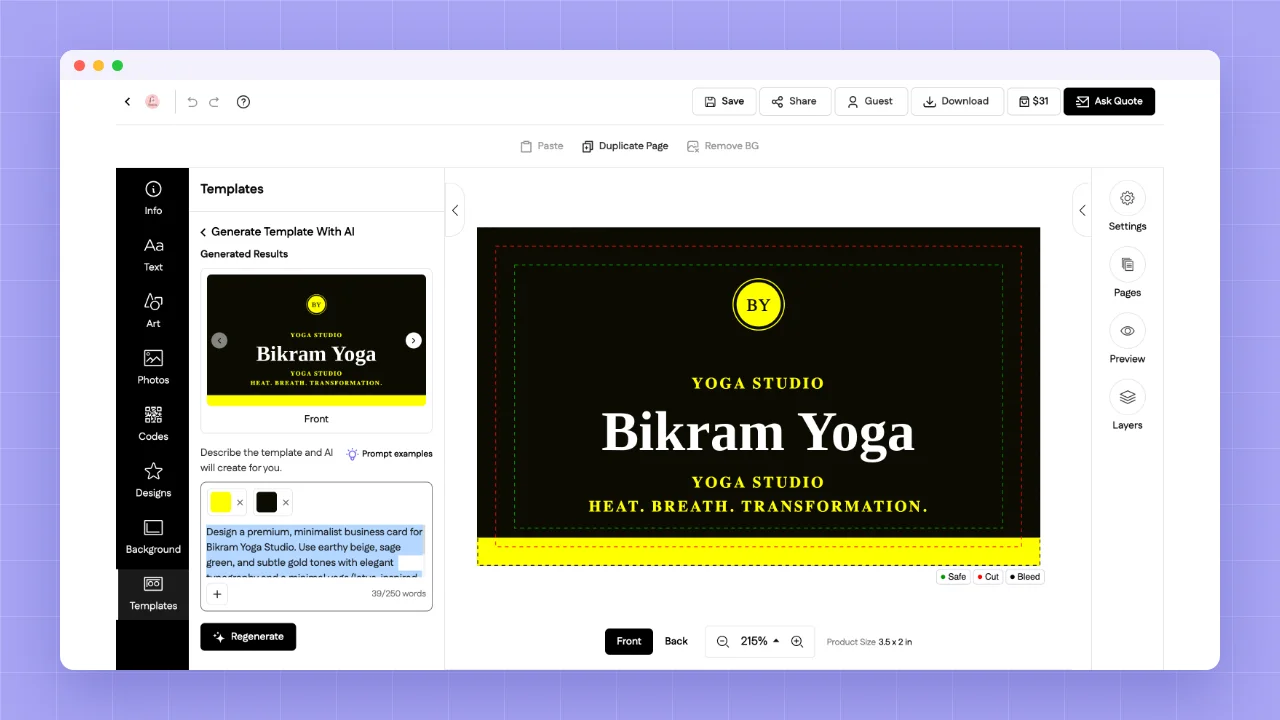
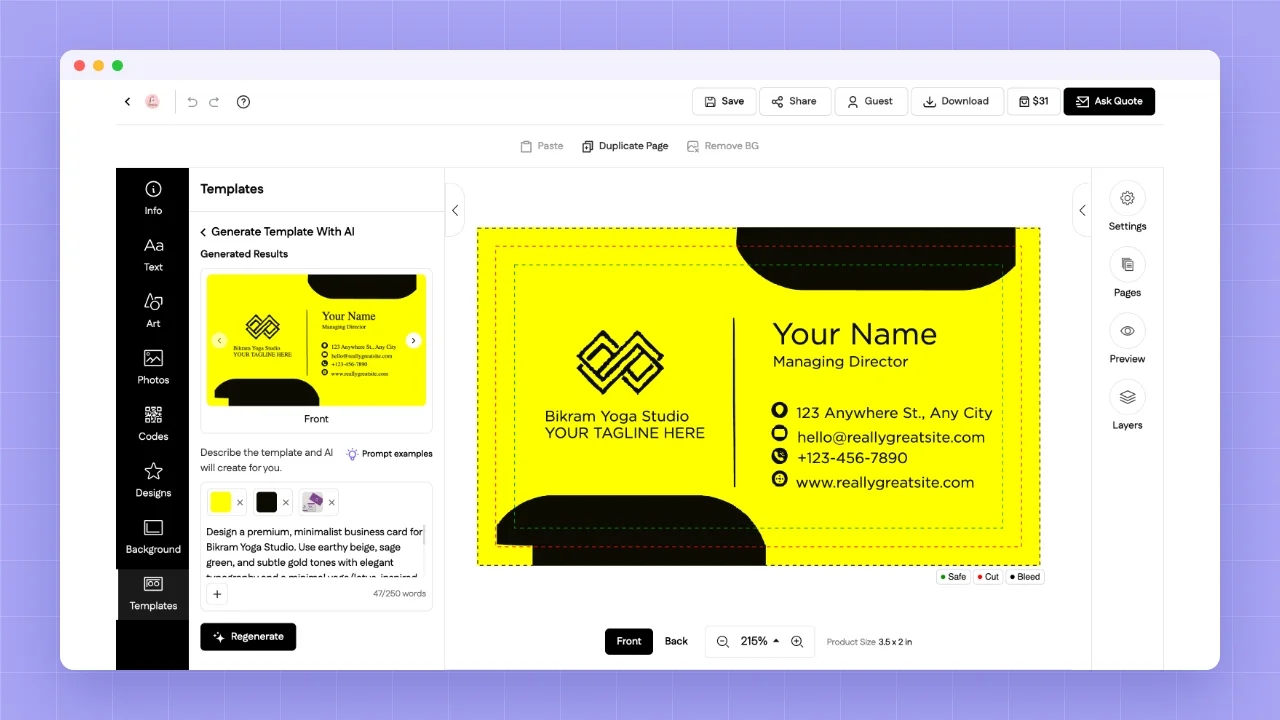
Example 1: A complete business card template from one prompt
Prompt: "Design a premium, minimalist business card for Bikram Yoga Studio. Use earthy beige, sage green, and subtle gold tones with elegant typography and a minimal yoga/lotus-inspired logo. Create a sophisticated, peaceful, double-sided design with a clean, professional layout."
Result: We also picked two brand colors in the editor, yellow and black, and DesignO used those. It generated several double-sided template options with the studio name, a tagline and a monogram logo, all placed neatly inside the safe area. The customer flips through the options, picks one and makes it theirs.
Not sure what to type? DesignO shows prompt examples right next to the prompt box, so customers never stare at an empty field.
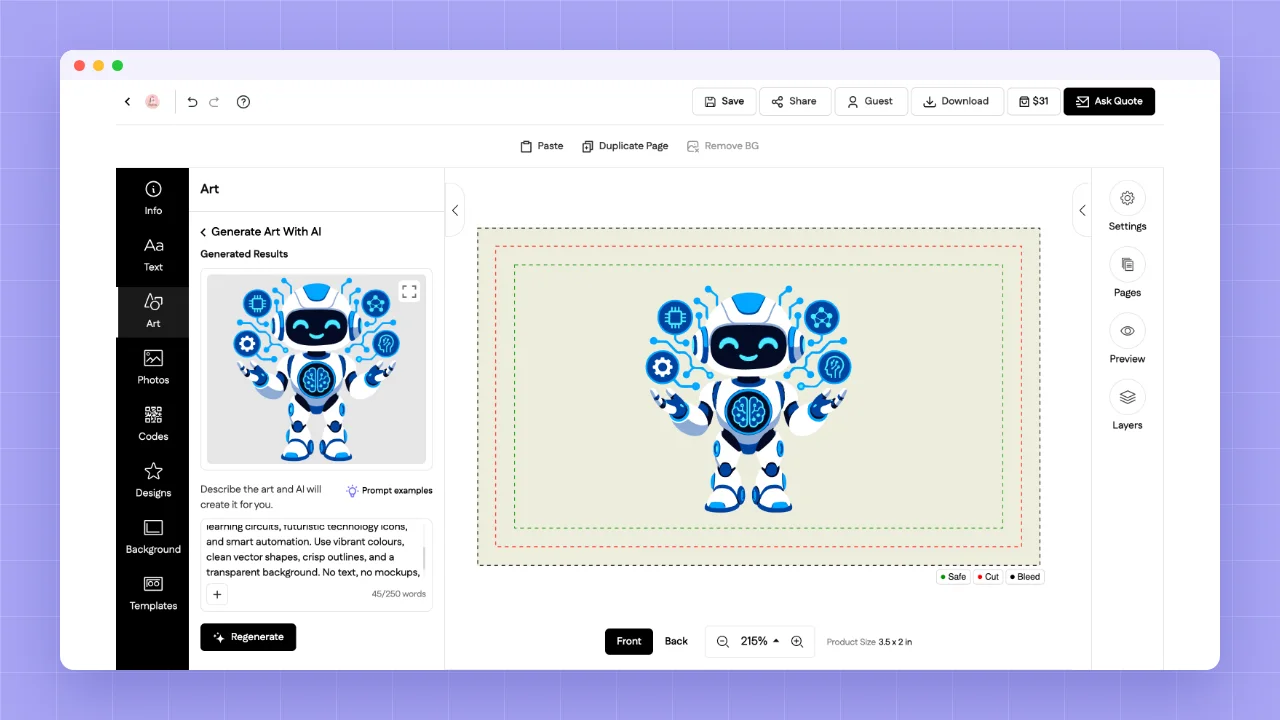
Example 2: Custom clipart, without a clipart library
Prompt: "Create a modern AI-themed clipart featuring artificial intelligence elements such as neural networks, AI robots, digital brains, machine learning circuits, futuristic technology icons, and smart automation. Use vibrant colours, clean vector shapes, crisp outlines, and a transparent background. No text, no mockups, print-ready high-resolution artwork."
Result: A friendly robot surrounded by tech icons, in a clean vector style, placed straight onto the product. If it isn't quite right, one click on Regenerate gives a new version.
The next step is conversational personalization. The customer says "make the text bigger" or "move the logo to the top right," and the design just updates. It's less like using software and more like talking to a designer. I went deeper on this in AI in Web-to-Print: An Honest Look.
The simple rule: every time a customer can turn their imagination into a design without getting stuck, you've saved an order.
Ask yourself: if a customer has an idea but no artwork, can your web to print design tool still get them to checkout?
2. Make artwork generation instant
Now let's take that one step further.
Picture a small business owner. Let's call him Mike. He's just opened a bakery and needs business cards, a shop banner, menu cards, stickers for boxes and some branded t-shirts for staff.
The traditional way? Mike finds a designer, waits for a logo, sends files back and forth, then uploads each design product by product. Weeks of effort before he orders anything.
Now imagine Mike just pastes his website URL or LinkedIn page into your storefront. AI reads his brand: logo, colors, fonts, tone. And it builds a ready-to-order brand kit across your products. Cards, banner, stickers, tees. All matching. All editable.
That's not a small improvement. That's personalization made 100 times easier than the traditional way.
And look at what it does for you:
Bigger orders. Mike doesn't buy one item. He buys the whole kit.
Faster decisions. He sees his brand on real products in minutes.
Repeat business. His kit is saved, so reordering is one click.
And this isn't a someday idea. The first piece of it already works in DesignO.
What it looks like today: website URL to business card
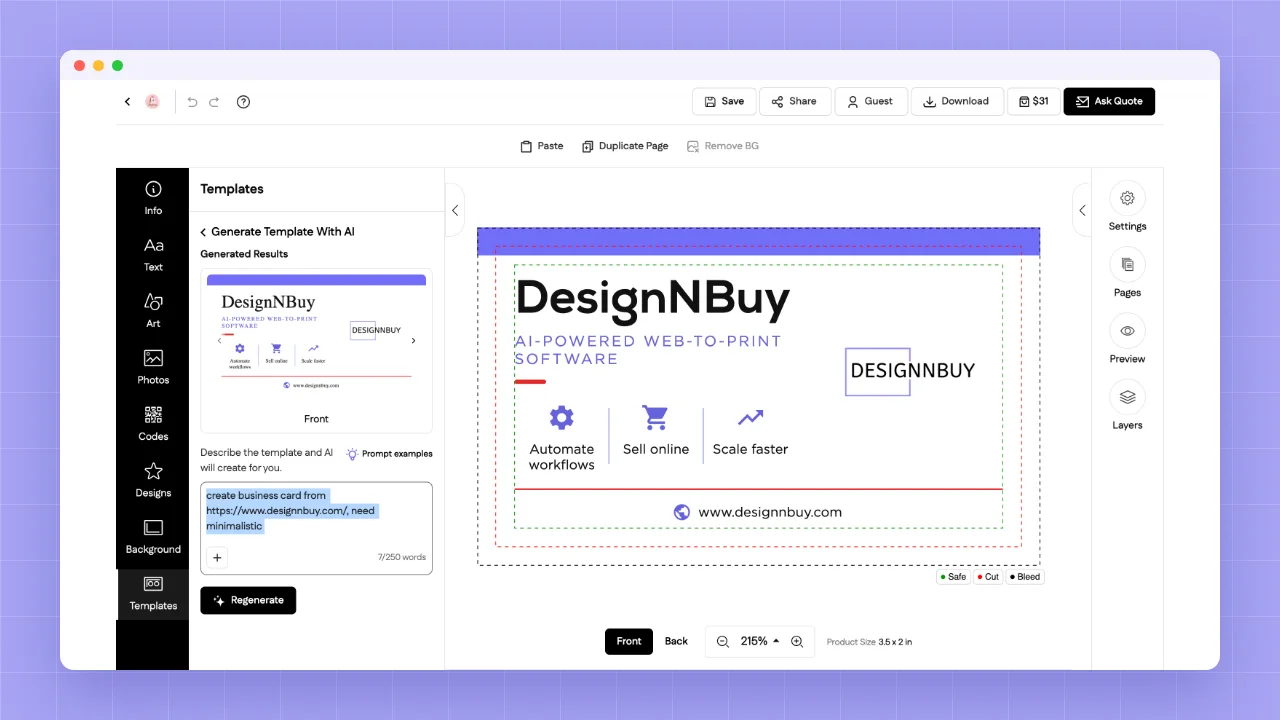
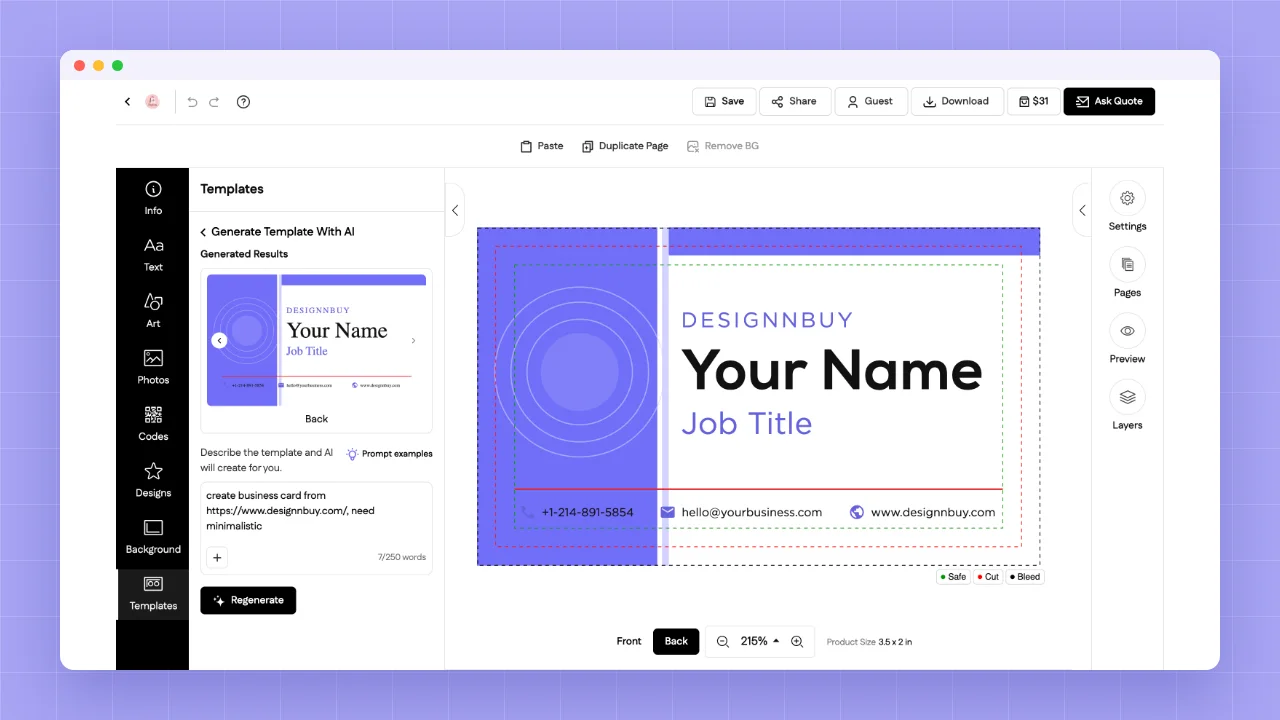
Example 3: A website URL turned into a business card
Prompt: "create business card from https://www.designnbuy.com/, need minimalistic"
Result: DesignO read our website and built a double-sided card on its own. The front carries the DesignNBuy name, our "AI-powered web-to-print software" line, three short value points (automate workflows, sell online, scale faster) and our web address. The back is ready for a name and job title, with our phone number and website. All in our purple brand color.
Seven words of prompt. A print-ready business card.
Today it's a business card. Stretch the same idea to banners, stickers and apparel, and you have a full brand kit. That's why it belongs at the top of your 2027 plan.
3. AI growth hacks for your web-to-print business
Most print businesses add products based on gut feel. "We already have the machine, so let's sell this."
AI lets you do better, without hiring an analyst. Here are four hacks you can try this week.
Hack 1: Discover products in demand in your target location
Ask an AI assistant something like:
"What custom printed products are most in demand for small businesses and events in [your city]? Consider local industries, seasons and upcoming events."
You'll often spot gaps you hadn't thought of. A university town wants different things than an industrial hub.
Hack 2: Research pricing
Ask AI to compare what local and online competitors charge for, say, 500 business cards or a 3×6 ft vinyl banner. Then double-check the top few yourself.
You'll quickly see whether you're underpriced, overpriced or sitting right in the middle.
Hack 3: Find the profitable products
Demand alone isn't enough. Give AI your rough costs (material, ink, labor time) and ask it to rank products by likely margin.
The sweet spot is products with good demand and healthy margin. Those are the ones that deserve a prime spot on your web to print storefront.
Hack 4: Let AI populate your products
This is where it saves real hours. Once you know what to sell, AI can draft product titles, descriptions, size and option lists, and even SEO text for each product page.
You review, tweak and publish. What used to take a week takes an afternoon.
One honest note: AI research is a starting point, not gospel. Always sanity-check numbers before you set prices.
4. Make your business discoverable: get on Google Business Profile
This one isn't glamorous. It's also free. And it's the step I see skipped most often.
Print businesses invest in a storefront, in web to print software, in new machines. But they don't spend one afternoon making sure people can actually find them.
Here's a number worth sitting with. In the US alone, people search "printing near me" around 147,000 times a month, and "print shop near me" around 42,000 times a month (Ahrefs, November 2026).
What does Google show for those searches? Mostly the local map pack: businesses listed on Google Business Profile.
If you're listed and someone nearby searches, you can show up right at the top. With your directions, phone number, opening hours and reviews. One tap to call. One tap to visit.
If you're not listed, you simply don't exist for that customer.
Your quick checklist:
Claim and verify your Google Business Profile
Add photos of your shop, machines and finished work
List your services (business cards, banners, signage, apparel and so on)
Link to your web to print storefront so people can order online
Ask happy customers for reviews
Post updates regularly, like new products or seasonal offers
Then cover the other big directories in your country too: Bing Places, Apple Business Connect, Yelp and local listings
One afternoon of work. Years of free visibility.
5. Think AI-first: become an AI-native print business
This is the big mindset shift for 2027.
Look at every manual task in your business and ask: could AI do this? Usually, the answer is yes. Here's what that looks like in practice.
Task | Old way | AI-first way |
|---|---|---|
Orders from email | An order lands in Gmail. Someone copies it by hand into the order system. Typos happen. | Gmail is connected to order management with AI. The order is read, created and confirmed. Done. |
Storefront to production | The storefront and job management don't talk. Someone re-enters every job. | The moment an order lands, it moves into print job management automatically, with files and specs attached. |
"Where's my order?" calls | Customers call or email for order and shipping status. Your team stops work to look it up. | Customers ask your AI assistant and get order, proof and tracking status instantly, any time of day. |
The pieces are already there: a print order management system, print job management, and tools like n8n, Make.com and Zapier to connect them. None of this needs a huge IT team anymore. We walked through a real setup in Print Workflow Automation with DesignO and n8n.
The rule for 2027: whatever the manual task is, think automation with AI first.
Your 2027 web-to-print storefront checklist
Focus area | Start with this |
|---|---|
AI personalization | Turn on AI templates, clipart and backgrounds in your design tool |
Artwork generation | Let customers start from a website URL, and plan for full brand kits |
AI growth hacks | Run the four AI prompts above for your city |
Local discovery | Claim and complete your Google Business Profile |
AI-first operations | Automate one manual task this month |
You don't need to do all five at once. Pick one. Get it working. Then move to the next. That's how the 80/20 works.
Want to see how other print businesses made the shift? Read our customer success stories.
Ready to build an AI-ready storefront?
Frequently Asked Questions
Abhishek Agarwal
Co-founder | CMO, DesignNBuy
Abhishek Agarwal (Co-founder/CMO, DesignNBuy) has 15+ years of IT & web-to-print experience. He specializes in sales, marketing, and strategic business growth, delivering innovative solutions to global printers and mentoring teams.
All Posts