How to Choose the Right Print Shop Management Software for Your Business in 2026
 Tavishi
Blog article content
Print shop management software is the single platform that runs your print operation, including order intake, design, pricing, production, and customer communication, from one place instead of scattered spreadsheets, email threads, and disconnected tools. Choosing the right one in 2026 comes down to five things: whether it fits how you actually sell (storefront, B2B, franchise), whether it handles your pricing model, how well it integrates with your eCommerce stack, the quality of support and onboarding, and whether the vendor keeps pace with platform updates. This print shop management software guide walks you through each, plus the red flags and the exact questions to ask before you sign.
You’re probably reading this because running your print shop has started to feel like managing software, not printing. Orders come in from your website, a Shopify store, a WooCommerce plugin, and email, and keeping them in sync eats your day.
We see this constantly across the packaging, commercial, and merchandise printers we work with. It’s the single most common reason businesses start shopping for print shop management software in the first place.
The good news: you don’t need to rip out your stack or hire developers to fix it. You need to pick the right print shop software, and know how to tell a good one from a costly mistake.
In this guide, I’ll walk you through what print shop management software actually does, the features that matter, how to evaluate vendors, the red flags to watch for, and the questions to ask before you commit. Let’s get into it.
What Is Print Shop Management Software?
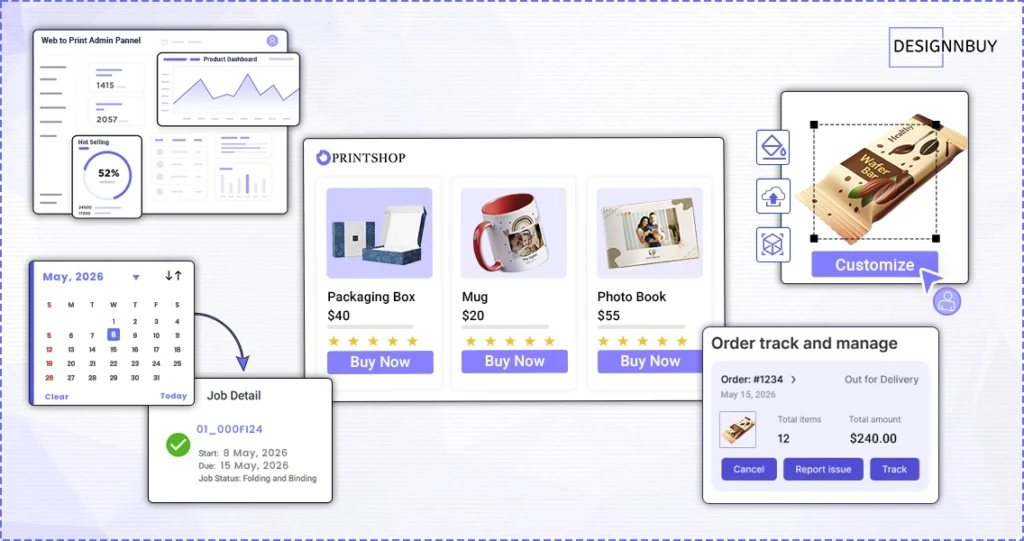 Print shop management software is a platform that brings the core operations of a print business into one system. At a basic level it handles order management, pricing, production tracking, and customer data. At an advanced level it connects your online storefront to your production floor, syncs orders across multiple eCommerce platforms, and gives corporate clients their own branded portals.
The goal is simple: cut the manual work that slows print businesses down. Without a dedicated web-to-print software, order details get lost in email, pricing errors slip through because numbers are calculated by hand, and your production team wastes time chasing job information. Good software gives everyone a clear view of what needs to happen and when.
Here’s the short version: it’s the difference between running your shop on software and running it despite your software.
Why It Matters More in 2026
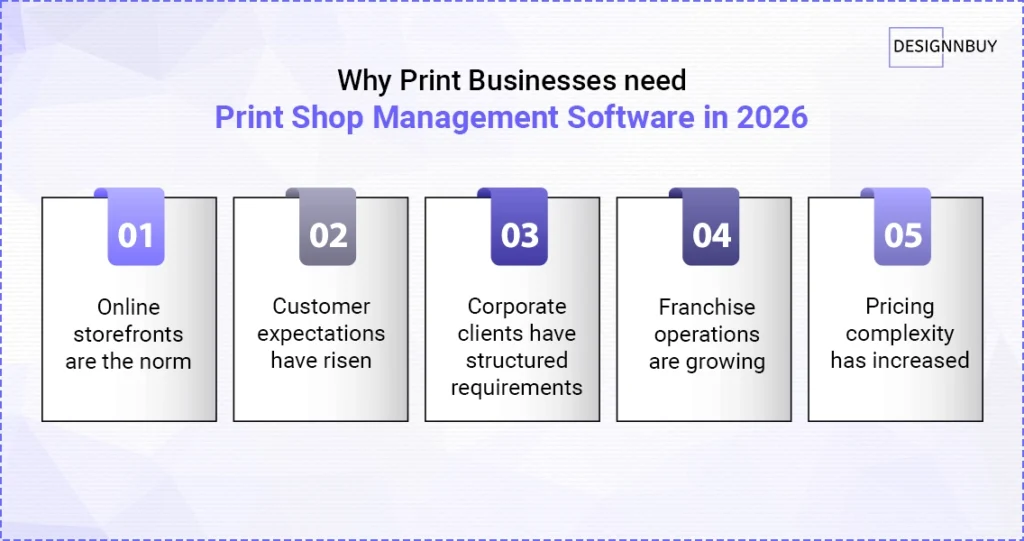 The print business today looks nothing like it did five years ago. A few shifts have made this software essential rather than optional.
Online storefronts are the default. Most print businesses now sell through at least one online channel: their own site, a WooCommerce store, a Shopify storefront, or several at once. Managing those manually doesn’t scale.
Buyers expect more. Accurate pricing at checkout, real-time status updates, and a smooth design-to-order flow are now table stakes.
Corporate clients have structured needs. B2B orders aren’t retail orders. They expect department-level controls, centralized templates, and credit-based purchasing that standard eCommerce can’t deliver out of the box.
Franchise networks are growing. Multi-location print brands need central control over brand assets while each location runs its own day-to-day.
Pricing got complicated. Merchandise and promotional pricing juggles color counts, print-area size, setup fees, and quantity breaks at once. That needs purpose-built logic, not a generic formula.
The market reflects this. The print shop management software category is on a steep growth curve, projected to keep expanding at a high single-digit CAGR through the early 2030s.
All of it points the same way: print businesses that want to grow need software built for the scale and variety of how they actually operate now.
Core Features to Look For In a Print Shop Management Software
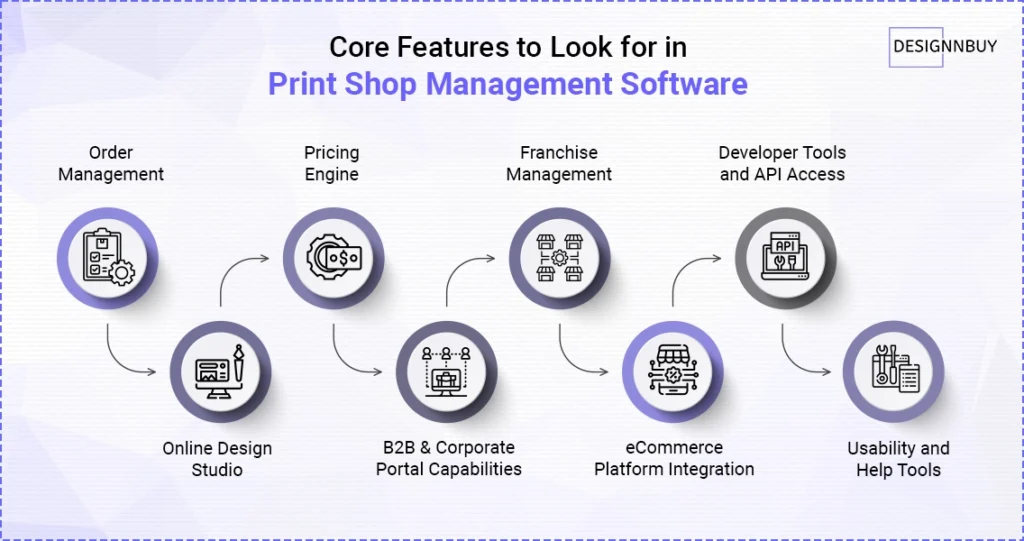
Not all print shop management software is built the same. The right mix depends on your business, but a serious operation needs most of the following.
1. Order Management
Order management is the heart of the system. You want one place to view, track, and process every order, whether it came from your storefront, a Shopify integration, a WooCommerce plugin, or manual entry by your team.
In 2026, that also means bi-directional order status sync. When a status changes on your eCommerce platform, the software should update automatically, and when you update it inside your print system, it should push back to the platform. DesignO does this across Shopify, Magento, WooCommerce, and BigCommerce, storing and returning the exact status values each platform sends, with no reformatting or manual mapping.
And if an order doesn’t sync because of a network hiccup or API timeout, DesignO includes a Fetch Orders utility to recover missed orders by Order ID or date range.
2. Inventory Management
If you stock blanks, substrates, or finished goods, the platform should track stock levels by product and quantity, show what’s been debited and what remains, and support shipping to multiple locations. Missing this is a common gap in design-first tools that bolt on operations later.
3. Online Design Studio
The software should come with, or connect directly to, an online design editor that lets customers create their own designs. Look for product templates, custom uploads, text editing, and print-ready file generation.
In DesignO, the design studio includes mobile canvas zoom controls so customers can work accurately on small screens, and a Product Info Panel toggle that lets admins control whether end customers can see and change product settings mid-design. DesignO also as an AI-powered text and image enhancer to help you with all your design and text needs.
4. Pricing Engine
Print pricing is rarely simple. Good software handles tiered quantity pricing, add-on charges, and multi-variable merchandise pricing, accurately and consistently at every step of the order.
DesignO’s Merchandise Pricing Engine handles products with multiple configurable variants. Base prices, printing fees, customization charges, and quantity-break tiers all apply accurately, and the price in the storefront cart matches the price in the backend order panel. That alone removes one of the most common sources of customer disputes.
A K-Cup supplier cut pricing errors by 40% with DesignNBuy. A leading custom K-Cup supplier was losing time to order delays and pricing mistakes that frustrated customers. After moving to DesignNBuy, they reduced errors by 40% and absorbed growing order volumes without adding manual work. Read the full case study
5. B2B and Corporate Portals
If you serve corporate clients, a standard storefront isn’t enough. You need department-based user management, role-based access, centralized template libraries, and credit-based purchasing.
DesignO includes a full B2B Web-to-Print Corporate Portal: a separate, branded storefront per corporate client, with department and location structures, order history by department, and centrally enforced brand templates. Employees order directly, without back-and-forth approvals.
Learn how B2B and B2C web-to-print storefronts differ.
6. Franchise Management
For franchise networks, look for a two-tier structure: a master dashboard for the central team and individual dashboards per location.
DesignO’s Franchise Management Module is built around this. The master owner controls brand assets, approved templates, product catalogs, and pricing rules; locations operate within those boundaries from their own dashboards. New locations inherit the master configuration from day one.
7. Workflow Automation and Production
The whole point is fewer manual touches. Look for automated job routing, preflight checks on uploaded files, production scheduling, and, where relevant, integration with your equipment or MIS. The less a human has to re-key, the faster jobs move.
8. Integrations
Modern shops run on a stack. Your platform should connect to the systems you already use, including eCommerce platforms, payment gateways, shipping carriers, and accounting or ERP/MIS tools, so data flows instead of getting re-entered.
9. Developer Tools and API Access
If you build on top of your print software, API access matters. DesignO includes a Swagger API interface so developers can connect to their DesignO server, run calls, view real-time responses, customize payloads, and copy ready-to-use code.
10. Usability and In-Product Help
Your team’s technical comfort varies, so the platform should be findable without a manual. DesignO provides contextual help that surfaces relevant video tutorials inside the Admin Panel and Design Tool, store-level default fonts, and per-product-type default profiles so new products are configured correctly from creation.
Standard vs Custom: Which Build Fits You?
One of the first real decisions is whether to adopt a ready-made platform or commission a custom build.
Standard (configurable) platforms ship with proven features such as storefronts, design editors, and order management, and offer faster setup, lower upfront cost, and continuous updates. For most growing print businesses, this is the right starting point.
Custom builds are developed around your exact workflows and give you total control over experience and integrations, but they cost more, take longer, and carry ongoing maintenance.
Here’s the part most guides skip: the line has blurred. Modern platforms are configurable enough that you rarely have to choose between “rigid off-the-shelf” and “expensive bespoke.” DesignO, for example, supports custom web-to-print development on top of a standard platform, so you get speed and the room to tailor.
SaaS vs Licensed (Self-Hosted)
The other structural choice is deployment.
SaaS / Cloud | Licensed / Self-hosted |
Subscription pricing, the vendor manages hosting and updates, faster to launch, lower upfront cost. Best if you want to move quickly and keep IT overhead low. | Typically a larger upfront investment plus maintenance, but more control over infrastructure and data residency. Often preferred by larger operations with specific compliance or hosting requirements. |
A useful tiebreaker: ask whether the vendor lets you start on SaaS and migrate to licensed later as you scale. Flexibility here protects you from re-platforming down the road.
How to Choose The Right Print Shop Management Software: A 5-Point Evaluation Framework
When you’re comparing platforms, run each one through these five questions.
Does it support your eCommerce platforms? If you sell on WooCommerce, Shopify, Magento, or BigCommerce, confirm the integration is verified and actively maintained. DesignO is tested against WordPress 6.9.1 and WooCommerce 10.3.8, with full Shopify, Magento, and BigCommerce support.
Can it handle your pricing model? Standard print pricing and promotional-merchandise pricing are different problems. If you sell multi-variant merchandise with quantity breaks and setup fees, confirm the pricing engine is built for that before you commit.
Does it fit your business structure? Corporate clients or a franchise network mean a plain storefront won’t cut it. Look for purpose-built B2B portals and franchise tools.
What do support and onboarding actually look like? A platform is only as good as the help you get when something breaks. Look for in-product help, real documentation, and a responsive team.
Does it keep pace with platform updates? WordPress and WooCommerce ship updates constantly. Running an outdated plugin opens security and compatibility gaps that compound over time.
Red Flags to Watch For
Not every vendor is equal. Spotting these early saves you an expensive mistake.
Limited or brittle integrations with the tools you already run
Rigid storefront customization that can’t match your brand
Hidden setup, implementation, or “per-feature” costs that surface after the demo
Thin onboarding or training support
A dated interface or sluggish performance
No clear product roadmap or update cadence
Pricing that’s vague until you’re deep in a sales call
If a vendor can’t answer how often they ship updates or what onboarding includes, treat that as a signal.
Questions to Ask Before You Sign
Bring these to every demo:
How long does implementation typically take for a business like mine?
Which integrations are supported out of the box, and which need custom work?
Can the platform run both B2B and B2C storefronts?
How are merchandise and quantity-break pricing handled?
How often do you release updates, and how are they deployed?
What does onboarding and training include, and for how long?
Can I start on a lower-commitment plan and scale up?
What happens to my data if I migrate away later?
Tip: ask for a sample storefront during evaluation, not just a slide deck. Seeing your own product flow is worth more than any feature list.
How to Shortlist the Right Print Shop Management Platform
You don’t need a side-by-side scorecard of every vendor to make a confident choice. You need a shortlist that fits your operation. If a tool like YoPrint is already on your list, our YoPrint vs DesignNBuy comparison can speed up that side-by-side. Here’s a simple way to get there.
Start by writing down the three problems costing you the most time today: maybe it’s pricing errors, maybe order sync, maybe corporate clients asking for controls you can’t offer. Then judge each platform only against those, not against a generic feature list.
From there, run your shortlist through the 5-point framework above, book a demo with a sample storefront, and ask the questions in the previous section. A platform that answers those clearly, and shows you your own product flow working, has earned a place on the list.
If you are looking for print shop management software that is built for the scale and variety of how modern print businesses actually operate, DesignO is worth a close look.
Explore the full DesignO platform for commercial printers
After You Choose: Implementation and Onboarding
Picking the platform is half the job. A smooth rollout is the other half.
Plan first. Define what success looks like, whether that’s fewer pricing errors, faster turnaround, or less manual re-keying, and line up the resources to get there.
Onboard deliberately. Walk your team through the features early and surface issues during onboarding, not after go-live.
Train your people. Use the vendor’s documentation, video tutorials, and support. The shops that get ROI fastest are the ones that actually use the features they’re paying for.
Migrate carefully. If you’re moving off an existing system, plan data transfer, confirm migration support, and communicate the change to clients where it affects them.
Frequently Asked Questions
Ready to Run a Bigger Print Operation?
Tavishi
Content Writer at @DesignNBuy
Tavishi is a content writer at @DesignNBuy, focused on the web to print industry. She creates well researched, easy to read content that helps print businesses understand digital solutions, product customization, and modern printing workflows.
All PostsRelated Posts
Challenges for Printers in Europe: 10 Roadblocks (And How Web to Print Solves Each One)
7 Ways Using a Web to Print Software Will Actually Save You Money in 2026
The Complete Web to Print Implementation Guide: From Planning to Client Onboarding
Trusted by 2000+ Print Businesses
Ready to See It in Action?
Explore our print shop platform at your convenience. Request a demo URL to experience the storefront, design tool, pricing, and much more.