



How to Sell Greeting Cards Online Without Predesigned Templates: AI Guide for Print Businesses (2027)
 Abhishek Agarwal

Blog article content
Selling greeting cards online used to mean building hundreds of templates before the season started.
With AI in DesignO, customers describe the card they want and get a ready, editable design in the Design Studio.
They can generate templates, clipart and artwork, use their own colours and fonts, and fix photos with AI tools.
DesignO plugs into the store you already run, so there's nothing to migrate before the holiday rush.

🎥 Watch: AI Greeting Card Generator That Uses Your Brand Colors (1:54)
Every year around this time, print businesses ask us the same question: how do we sell more greeting cards online before Christmas? Holiday cards are one of the busiest products they sell all year. They're also one of the hardest to sell online. Every buyer wants something slightly different: a company card with their logo, a family photo card, a card in Spanish for their grandparents, a minimalist card in brand colours.
In our projects, the only way to cover that demand used to be a big template library, and most stores launched with too few designs. In 2027 you don't need one. With an AI greeting card maker inside your storefront, the customer creates the design and you print it. Here's how print businesses can sell greeting cards online this season without building predesigned templates first.
Why template libraries hold back greeting card sales
Most print stores that sell greeting cards online run into the same four problems.
Templates take months to build. A credible holiday range means dozens of designs per occasion, each in several sizes and layouts. By the time the library is ready, the season is half over.
No library covers every customer. One buyer wants a winter landscape, another wants their dog in a Santa hat, a third wants Diwali and Christmas on the same card. You can't predict all of it.
Language is a gap. Most template libraries are written in one language. Customers who want a card in Hindi, Spanish or French leave, or email you asking for a custom design.
Custom requests cost you time. Every "can you design this for me?" email lands on your design team during your busiest weeks of the year.
The result is the same: customers browse, don't find their card, and buy somewhere else.
How DesignO's AI lets customers design their own cards
DesignO is the online product designer that runs inside your store. Its AI tools sit in the Design Studio, so your customer never leaves the product page to create their card.
1. Generate a full card from a prompt
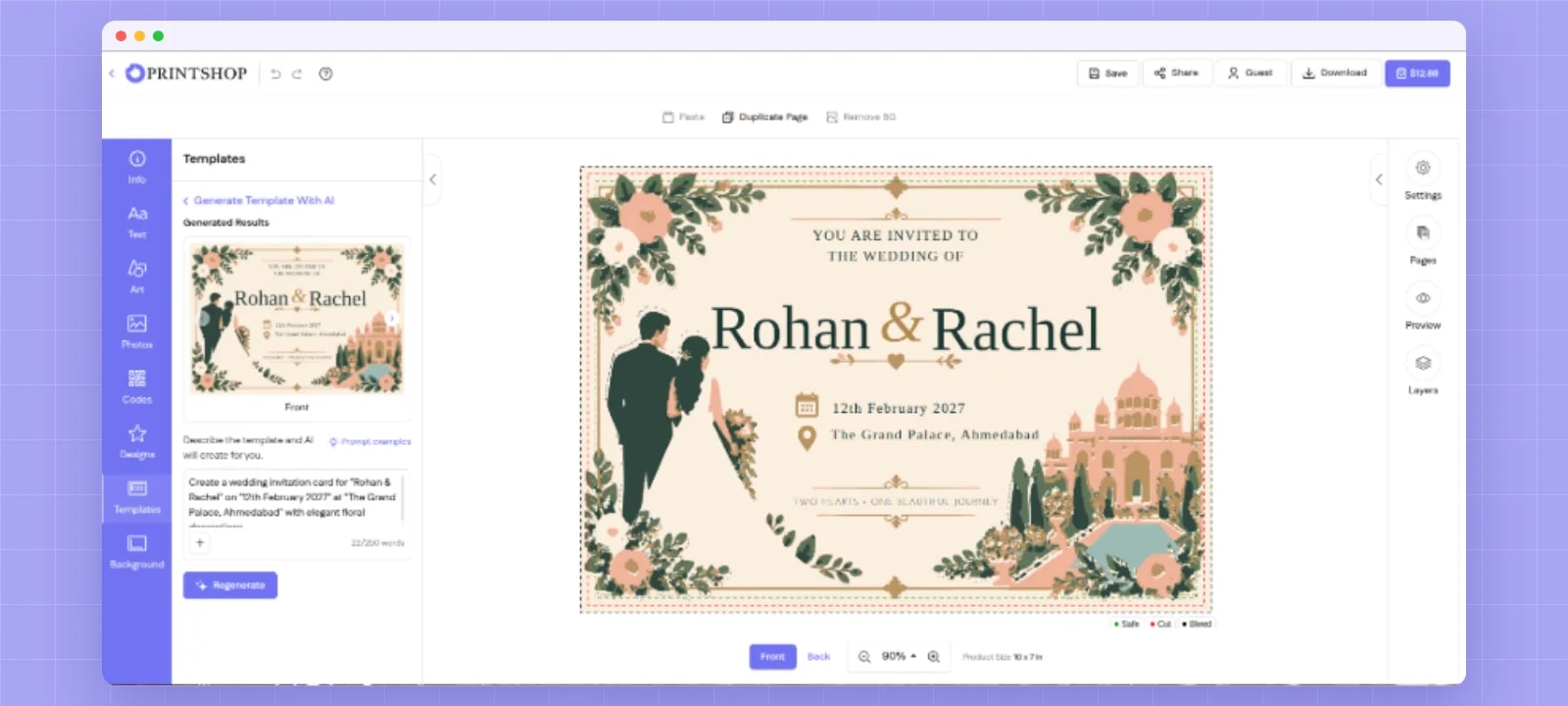
The customer clicks Generate Template With AI and describes the card: "A warm Christmas card with a snowy cabin, red and gold, space for a family photo." They pick colours and fonts, and DesignO returns ready layouts. Example prompts help customers who don't know where to start, and multi-page designs show in a page carousel so they can check the front and inside.
Example: a wedding invitation from a prompt
Prompt: "Create a wedding invitation card for 'Rohan & Rachel' on '12th February 2027' at 'The Grand Palace, Ahmedabad' with elegant floral decorations."
Result: a complete, editable invitation with the names, date and venue already in place, inside the safe, cut and bleed lines.
2. Edit the design after it's generated
The AI result isn't a flat picture. It lands on the canvas as a normal template, so the customer can change the message, move elements, swap photos and resize text before ordering. If they change the card size, template auto-resize refits the artwork to the new size.
3. Generate clipart and artwork for their exact idea
No clipart library has every idea a customer brings. With AI, it doesn't need to. Generate Art With AI creates clipart from a short description, and Generate Artwork With AI creates larger artwork pieces. Both drag straight onto the card.
4. Use their own colours and fonts
Corporate buyers want holiday cards in brand colours. Customers choose colours and fonts before generating, so the result matches their brand from the first draft. You can also import your own font library into DesignO, so every font you offer is available to the AI. Watch it on a Christmas card.
5. Write the card in their language
Greeting cards are personal, and many buyers want the message in their own language. With AI text translation in the Design Studio, a customer can turn "Merry Christmas and Happy New Year" into Spanish, Hindi or French on the card itself, without asking your team.
6. Create and edit images with AI
Photos make or break a holiday card, and the ones customers upload are rarely perfect. DesignO's AI image tools fix them inside the editor:
Prompt to image: generate a picture from a description, in landscape, portrait or square.
Reference image to design: start from an image the customer already likes and generate variations of it.
Remove background: cut a person or pet out of a photo in one click and place them on a new festive background.
Magic Eraser: brush over a stranger, a sign or a cable and the AI removes it.
Outpaint: extend a photo that's too small or the wrong shape for the card.
Draw and erase: add simple hand-drawn touches or clean up details.
Selling Christmas and holiday cards this season
The holiday rush is where this pays off fastest. Three types of buyers come back every year, and AI design serves each of them.
Corporate buyers. Companies order cards for clients and staff in December. They generate a card in their brand colours and fonts, add their logo and a team photo, and order in bulk. No design brief, no proof cycle by email.
Families. The family photo card is the classic holiday order. Customers remove the background from their photo, drop it on a festive scene and write a personal message. Magic Eraser removes anything unwanted in the background.
Multicultural households. Many families send cards in more than one language or celebrate more than one festival. Customers can write the greeting in their own language and mix Christmas, Hanukkah, Diwali or New Year themes in one design.
The same setup carries into the rest of the year: Valentine's Day, Mother's Day, weddings, birthdays and graduations. You add the card product once, and customers design for whatever occasion they're shopping for.
No migration: DesignO works in the store you already run
You don't need a new website to sell AI-designed cards before Christmas. DesignO plugs into your existing store. Add it as a Shopify product designer, use our web to print WooCommerce plugin, or install the Magento web to print extension. BigCommerce is supported too.
Your products, orders, customers and checkout stay where they are. A Personalize button on the product page opens the Design Studio in an overlay, so customers design without leaving the page. On Shopify, native discount codes also apply to personalized cards, which helps when you run holiday promotions.
What it means for your greeting card sales
Before AI | With AI in DesignO |
|---|---|
Months building templates before the season | Launch with a small starter set; customers generate the rest |
Customers leave when no template fits | Customers describe the card they want and get it |
One language in the template library | Customers write the greeting in their own language |
Custom design requests by email | Customers design it themselves in the Design Studio |
Poor customer photos slow down orders | AI removes backgrounds, erases objects and extends photos |
For your team, that means fewer custom design emails during your busiest weeks. For your customers, it means more ways to personalize, so more of them finish the order instead of leaving.
If you want the wider picture of how AI changes running a storefront, read our guide to launching a web to print storefront with AI.
What AI doesn't replace
AI makes card design easier, but it doesn't run your card business. You still need to:
Set up the product properly. Sizes, folds, paper stocks, envelopes and bleed decide whether the card prints well.
Check what goes to press. AI output is a design, not a proof. Keep preflight and a final check on holiday orders.
Plan your cut-off dates. Customers will design right up to Christmas. Publish clear order deadlines for shipping in time.
Price it. AI won't set your margins on short runs and premium stocks.
How to start before the holiday rush
Add DesignO to your existing store.
Set up your greeting card products: sizes, paper stocks, folds and envelopes.
Turn on the AI template, clipart and artwork generators for those products.
Add a small starter set of holiday templates for customers who prefer to browse.
Promote it on your homepage, in your newsletter and on social: "Design your own Christmas card, in your language."
Want to see it on a greeting card? Book a DesignO demo and we'll walk you through it on your own products.
Frequently Asked Questions
Abhishek Agarwal
Co-founder | CMO, DesignNBuy
Abhishek Agarwal (Co-founder/CMO, DesignNBuy) has 15+ years of IT & web-to-print experience. He specializes in sales, marketing, and strategic business growth, delivering innovative solutions to global printers and mentoring teams.
All Posts