



Web to Print Storefront with AI: 10X Easier in 2027
 Abhishek Agarwal

Blog article content
Web-to-print storefronts used to stall on four things: limited bandwidth, tight budgets, low team adoption and long implementations. In 2027, AI does the first draft of most of that work: product content, design assets, publishing, marketing, integrations, artwork proofing and market research. With AI built into your web to print software, customers can generate the artwork or template they need in the design studio, so you no longer need a huge asset library before launch. AI doesn't replace print know-how: pricing, prepress and fulfilment still need your team.
I've worked with print businesses launching web-to-print storefronts for years. The ones that stalled rarely failed because of the software. They failed because nobody had time to fill the store with products, write the copy, build the templates and keep marketing it after go-live.
In 2027 that looks very different. Most of that work can now be done, or at least drafted, by AI. Here's why I think launching, running and growing a web to print storefront is roughly 10X easier than it was before AI, and where the hard parts still are.
Why web-to-print storefronts used to fail
Industry surveys have said the same thing for a long time: the technology was rarely the real problem.
In NAPL's 2012 Digital Services Survey, only 52% of printers said web-to-print had increased sales. 20% said it hadn't, and 28% weren't sure yet.
In the NAPL Workflow Investment Survey 2014, 150 respondents called web-to-print their most worthwhile investment, while 40 called it their least worthwhile.
In In-plant Graphics' 2018 software study of nearly 200 in-plant print centres, 45% struggled to work with IT, 41% couldn't find a capable, available person to lead the implementation, and 40% had trouble justifying the spend (Rocsoft).
From our own projects, the reasons fall into four buckets:
Lack of bandwidth. Owners and CSRs were already busy running production. The storefront became a side project.
Limited budget. Photography, copywriting, template design and web development were each a separate cost.
Team adoption. Staff kept taking orders by phone and email because the storefront felt like extra work. Every product to set up and every file to fix landed on people who were already busy. If your own team didn't use it, customers were never pushed to it.
Long implementation. Months of setup before the first online order, and momentum faded along the way.
If you're planning a launch, our guide to common storefront launch mistakes covers the non-AI side of this.
What changed: AI is now part of everyday print work
AI isn't an experiment in print anymore. PRINTING United Alliance's 2025 study of more than 300 print providers found that 85% consider AI critical to staying competitive and 83% see it as a source of new opportunities. The most common starting point was generative AI for design and copy (PRINTING United Alliance). Keypoint Intelligence's 2025 Global Production Software Outlook reports that more than 80% of print service providers already use AI in some way.
Demand isn't the issue either. Expert Market Research values the global web-to-print market at about USD 36 billion in 2025, growing at 5.3% a year through 2035. What's changed is how much effort it takes to capture that demand.
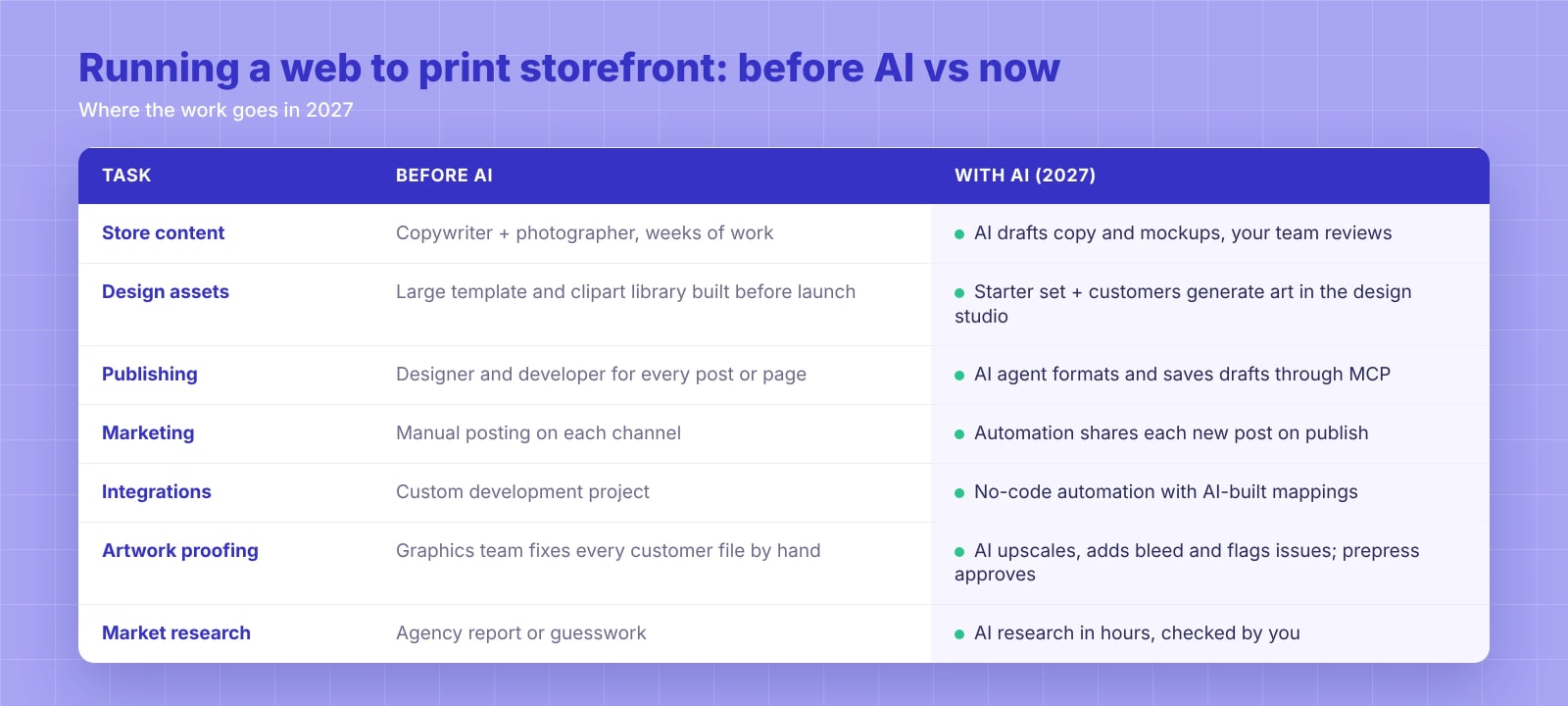
7 ways AI makes it easier to launch, run and grow a storefront
They map to three stages. Content and design assets help you launch. Publishing, integrations and artwork proofing help you run the store day to day. Marketing automation and market research help you grow it.
1. Content creation takes days, not months
A typical storefront needs product photos, mockups, category pages, product descriptions and SEO metadata for every item. That used to mean a copywriter and a photographer, and most printers launched with thin pages because of it.
Now AI drafts product descriptions in your brand voice, writes category and landing-page copy, and generates lifestyle mockups (a printed mug on a desk, a box on a shelf). Your team's job shifts from writing to reviewing. One rule: give AI your real specs (stocks, sizes, finishes, turnaround times). It will happily invent them otherwise.
2. You don't need to build a giant design asset library
Before AI, a credible storefront meant building thousands of templates, clipart, fonts and images before launch. That was often the single biggest delay.
With AI inside the online product designer, customers create what they need on the go. In DesignO, a customer who can't find the right clipart simply describes it and generates their own. A customer who needs a brochure can ask the AI to visit their website and build one from their brand colours, logo and content.
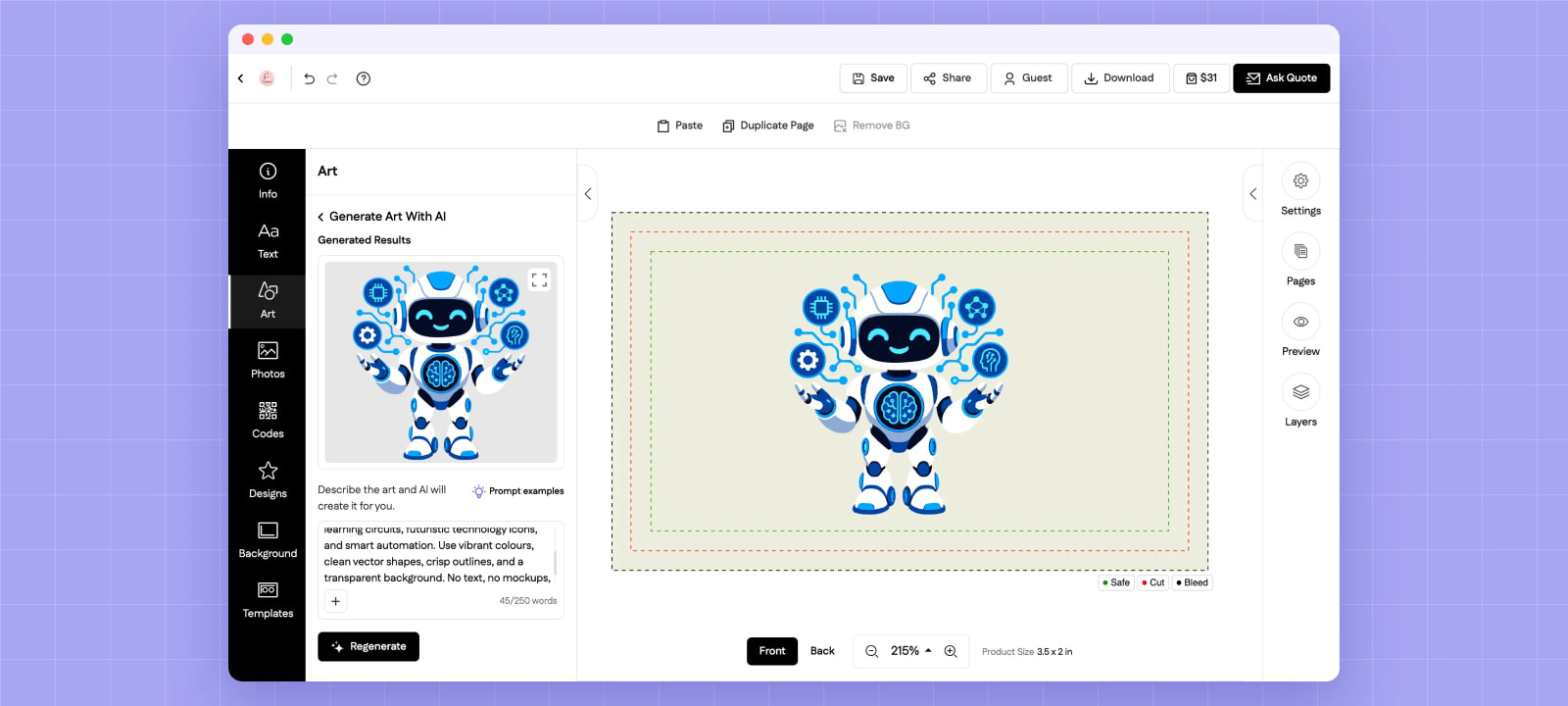
Example: AI artwork inside the editor
Prompt (excerpt): "…learning circuits, futuristic technology icons, and smart automation. Use vibrant colours, clean vector shapes, crisp outlines, and a transparent background. No text, no mockups…"
Result: print-ready artwork placed straight onto a 3.5 x 2 in business card, inside the bleed and safe lines.
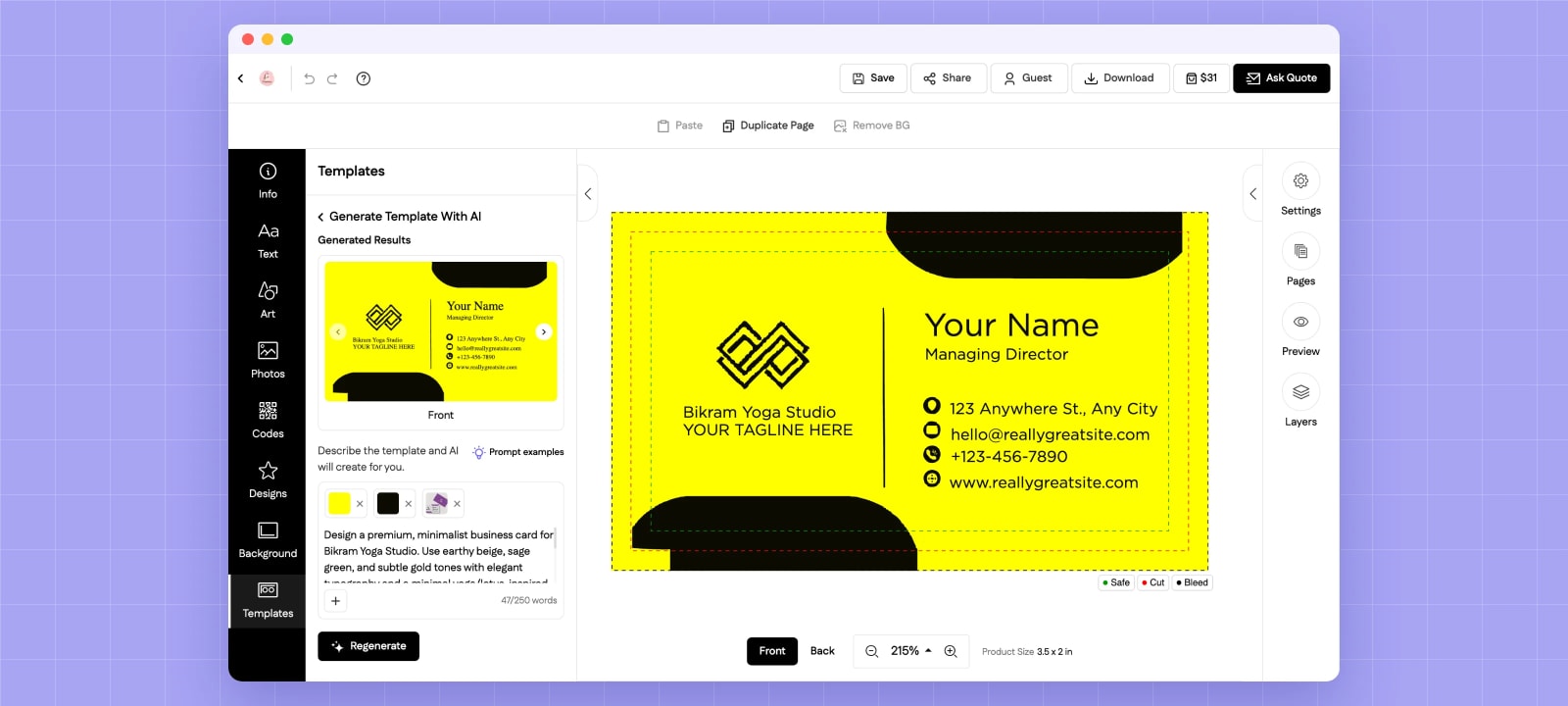
Example: AI template from a prompt and brand colours
Prompt: "Design a premium, minimalist business card for Bikram Yoga Studio…", with yellow and black picked as brand colours.
Result: several complete, editable layouts. The customer flips through them and keeps the one they like.
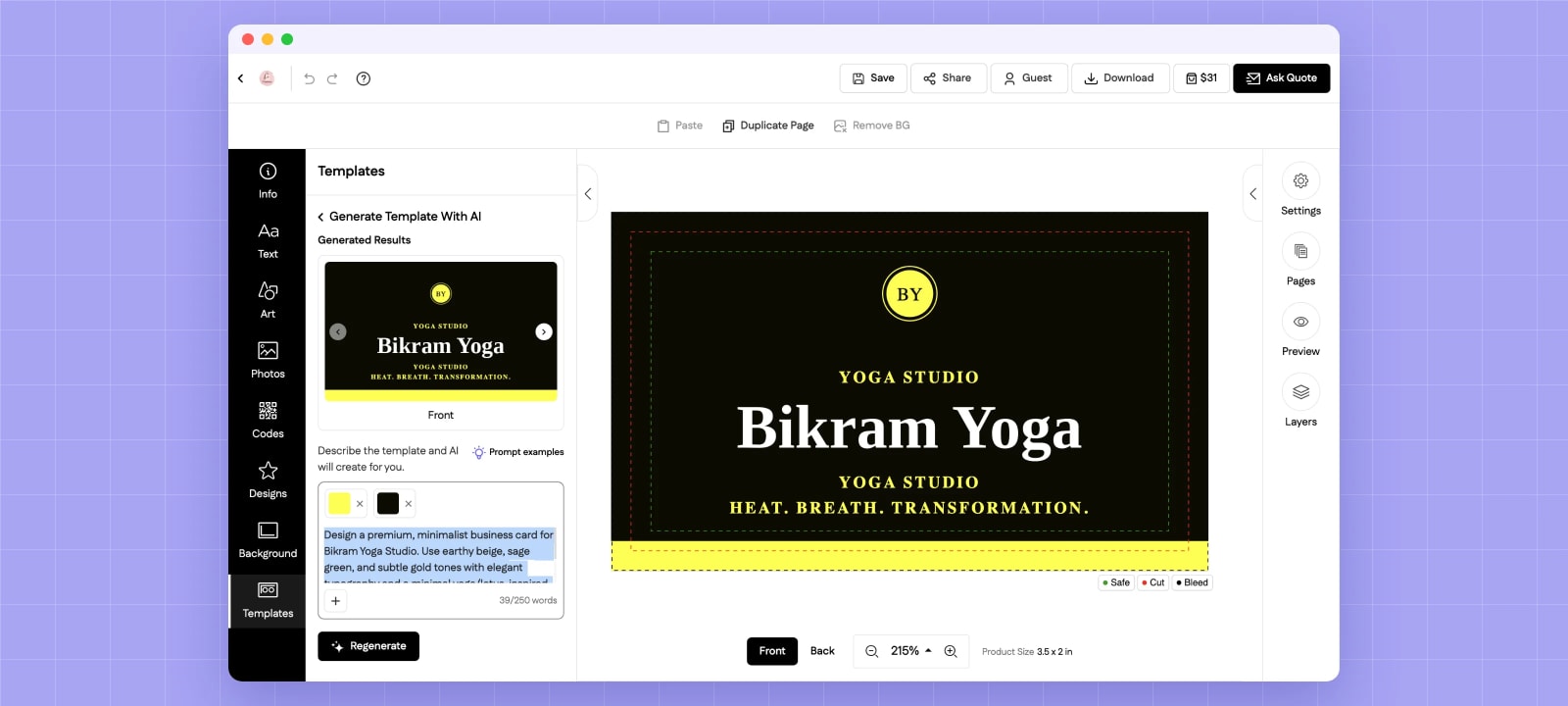
You still want a starter set of templates for your best sellers. But the clipart and asset library no longer has to be complete on day one, and the AI text and image editor covers the long tail.
3. Publishing no longer waits for a designer or developer
The big platforms now let AI agents work on your site through MCP (Model Context Protocol):
Shopify offers Shopify MCP and an open-source AI Toolkit (April 2026), so an agent can create products, update inventory and publish blog posts (Shopify).
WordPress released an official MCP Adapter in February 2026, and WordPress.com gave agents write access in March 2026, with new posts saved as drafts by default (WordPress).
Magento / Adobe Commerce has MCP modules that let an assistant edit CMS pages, categories and products.
In practice, you write or approve a blog post with your AI agent. It formats the headings, generates the images it needs, adds internal links and saves a ready-to-review draft on your site. This article was put together the same way. If your store runs on Shopify or Magento, the same agent can work on your product pages too.
4. Content marketing runs on autopilot
Publishing is only half the job. Each post also needs to reach LinkedIn, your Google Business Profile and wherever else your buyers are. With tools like Make or Zapier, a newly published post can be shared to those channels automatically, with a short AI-written intro. We do this for our own blog. A human still approves the post, but nobody copies and pastes it five times.
5. Integrations are a setup task, not a development project
Connecting systems used to mean weeks of custom code. Now, when an order comes in, a no-code automation can create the invoice in your accounting software, push the job to your ERP or MIS and notify production. AI helps write the field mappings and spot errors. Pair that with a proper print order management setup and most orders flow without retyping. Test with real orders first, and keep a human checkpoint before files go to press.
6. Proofing and fixing artwork no longer needs a design team
This used to be one of the most expensive parts of running a storefront. Customers upload logos pulled from their website, photos at 72 dpi and PDFs with no bleed. Every one of those files needed someone on the graphics team to fix it, make it press ready and send a proof back. On a busy day, that queue decided your turnaround time.
AI now handles most of those fixes in seconds:
Low-resolution images are upscaled so they hold up at print size.
Missing bleed is filled by extending the background, instead of a designer rebuilding the edges.
Backgrounds are removed in one click, which DesignO's editor offers as Remove BG.
Blurry or pixelated logos are redrawn as clean vectors.
Common file problems like text outside the safe area, low-contrast text or RGB colours are flagged before the order reaches you.
Automated preflight checks catch the rest, and the customer approves a proof that already looks like the final print. Your prepress team still makes the final call, but they review exceptions instead of fixing every file by hand.
7. Market research is on demand
Which products are in demand in your region? What do competitors charge for 500 business cards or a run of custom boxes? Which keywords and blog topics should you target? AI research tools can scan competitor sites, compare pricing and suggest content gaps in an afternoon, a job that used to need an agency or simply didn't get done. Check the numbers before you act on them, but the starting point is free.
Bonus: customer questions. AI chat on your storefront can answer turnaround, file-format and order-status questions around the clock, so your CSRs handle the conversations that need a person.
How the four old failure reasons change
Old failure reason | What AI changes in 2027 |
|---|---|
Lack of bandwidth | AI does the first draft. Your team reviews instead of creating from scratch. |
Limited budget | Fewer separate contracts for copy, photography, templates and development. |
Team adoption | AI takes over the dull parts: product setup, file fixes, reposting. The storefront saves your team time from the first week instead of adding work, so they actually use it and steer customers to it. |
Long implementation | Cloud web to print software plus AI-generated content gets you live sooner. |
What AI still doesn't fix
Easier doesn't mean automatic. AI won't:
Replace print know-how. AI fixes most file issues, but colour, substrates and finishing still need someone who knows print. Final preflight approval stays with your team.
Set your pricing strategy. It can show you competitor prices. Margins are your call.
Run fulfilment. Quality, turnaround and delivery are still where you win or lose customers.
Sell for you. As WhatTheyThink noted years ago, web-to-print projects fail when the business doesn't lead them, sales doesn't sell them and customers don't use them. That's still true.
Review everything AI produces, especially specs, prices and claims about your business.
A practical starting point
Choose web to print software with AI built into the editor, not bolted on.
Launch with your 20 to 30 best-selling products, not the full catalogue.
Let AI draft copy and mockups, then check every spec.
Seed a small template set and let customers generate the rest.
Connect your CMS through MCP and automate social and Google Business Profile posting.
Link orders to your accounting and MIS before volume grows.
Run an AI market and keyword check every month.
Frequently Asked Questions
Abhishek Agarwal
Co-founder | CMO, DesignNBuy
Abhishek Agarwal (Co-founder/CMO, DesignNBuy) has 15+ years of IT & web-to-print experience. He specializes in sales, marketing, and strategic business growth, delivering innovative solutions to global printers and mentoring teams.
All PostsRelated Posts
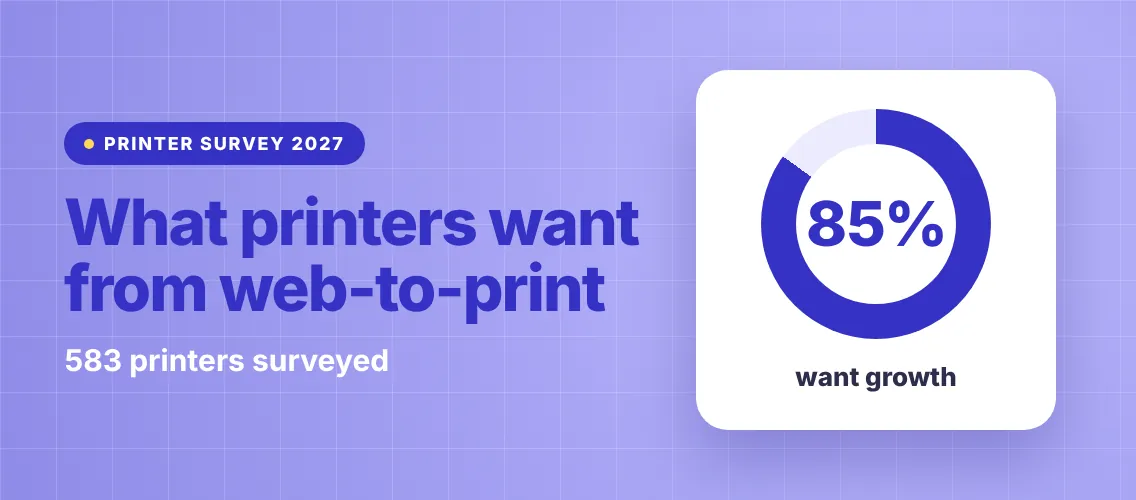
What Printers Want From Web to Print Software in 2027 (Survey of 583)
Print Buyer Behavior in 2027: 4 Printing Industry Trends Every Printer Should Plan For