How to Start a Profitable Canvas Printing Business in 2026: The Complete Guide
Learn how to start a canvas printing business in 2026 with the right equipment, web-to-print storefront, customization tools, and marketing strategy. See how DesignNBuy helps automate online canvas pr
 Abhishek Agarwal
Blog article content
A canvas printing business lets you sell custom photo prints, wall art, and personalized canvas products online. It is one of the most accessible segments in the print industry to launch right now. The global wall art and canvas print market is valued at USD 78.06 billion in 2026, growing at a projected CAGR of 5.22% through 2035 (Source: Market Research Future, 2026).
Whether you’re starting from home or scaling an existing print shop, this guide walks you through everything: choosing your business model, selecting equipment, setting up a web-to-print storefront, and marketing your products effectively.
If you’ve been thinking about entering the canvas print space, the timing couldn’t be better. Consumer demand for personalized home décor, custom photo gifts, and wall art continues to climb. This growth is driven by e-commerce expansion, social media trends, and the rise of AI-powered design tools that make customization easier than ever.
Let me break it down step by step.
Key Takeaways
The global wall art and canvas print market is worth USD 78.06 billion in 2026 and is expected to reach USD 123.4 billion by 2035, making canvas printing a high-growth opportunity.
You can start a canvas printing business from home with as little as $2,000 to $5,000 for basic equipment, or invest $10,000 to $25,000 for a professional in-house setup.
Gross profit margins on canvas prints typically range from 40% to 65%, depending on whether you print in-house or use a print-on-demand model.
A web-to-print storefront with real-time product customization is essential for scaling. It automates design, pricing, and order processing.
Top-selling canvas niches include pet portraits, family photos, motivational quotes, landscape photography, and custom corporate art.
Offering 2D and 3D previews, multiple canvas sizes, and wrap options significantly increases conversion rates and reduces order errors.
Why Start a Canvas Printing Business in 2026?
Starting a canvas printing business in 2026 makes sense for three reasons: consumer spending on personalized wall art and photo products is at an all-time high, e-commerce platforms make it easy to sell globally, and web-to-print technology has dramatically lowered the barrier to entry.
Here’s what’s driving the opportunity:
Massive market size: The global wall art and canvas print market reached USD 74.19 billion in 2025 and is projected to grow to USD 123.4 billion by 2035 at a CAGR of approximately 5.22%.
Strong e-commerce demand: Etsy alone reported $412 million in GMV from canvas prints in 2026, up 18.3% year-over-year, with an average order value of $89.40. That tells you buyers are willing to pay premium prices for custom canvas products.
Digital printing growth: The canvas for digital printing market is estimated at USD 1.62 billion in 2026, reflecting the shift from traditional to digital production methods.
Personalization trend: Consumers increasingly want products that reflect their identity. Custom photo canvases, pet portraits, and personalized gifts are among the fastest-growing categories in print e-commerce.
Now here’s where it gets interesting. Unlike many product businesses, canvas printing has relatively low startup costs, high margins, and strong repeat purchase potential, especially when you offer customization.
Step 1: Choose Your Canvas Printing Business Model
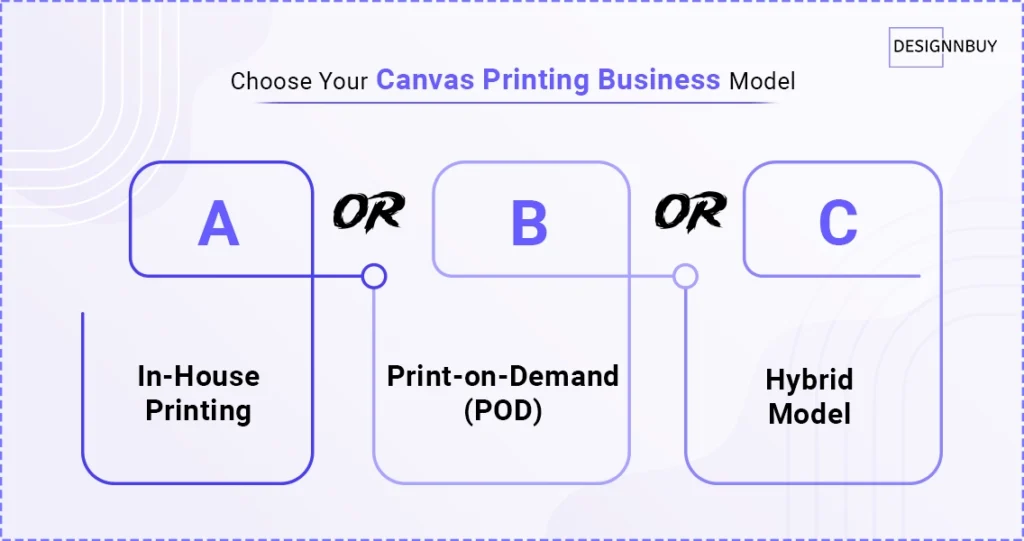 The three main business models for a canvas printing business are in-house printing, print-on-demand (POD), and a hybrid approach. Your choice depends on your budget, volume expectations, and how much control you want over production quality.
A) In-House Printing
You buy the printer, canvas rolls, stretcher bars, and finishing equipment. You control quality, turnaround time, and margins. Startup costs range from $5,000 for a basic home setup to $25,000 or more for a professional operation with a wide-format inkjet printer.
B) Print-on-Demand (POD)
You design the storefront and handle marketing. A third-party fulfillment partner prints and ships each order. This model has lower upfront investment ($500 to $2,000 for website and marketing), but lower margins (typically 20% to 35%) and less control over quality.
C) Hybrid Model
Start with POD to validate demand, then bring production in-house as volume grows. This is the approach we see many successful print businesses take. It reduces risk while building a customer base.
Canvas Printing Business Model Comparison
Factor | In-House | Print-on-Demand | Hybrid |
|---|---|---|---|
Startup Cost | $5,000 to $25,000+ | $500 to $2,000 | $500 to $5,000 initially |
Gross Margin | 50% to 65% | 20% to 35% | Varies by phase |
Quality Control | Full control | Limited | Grows over time |
Scalability | Equipment-dependent | Highly scalable | Flexible |
Turnaround Time | 1 to 3 days | 3 to 7 days | Varies |
Step 2: Understand Your Startup Costs and Profit Margins
A home-based canvas printing business can be started for $2,000 to $5,000, while a professional setup with wide-format printing equipment typically costs $10,000 to $25,000. Gross profit margins on direct-to-consumer canvas prints generally range from 40% to 65%.
Let me show you a quick profit example.
Canvas Print Profit Margin Example (In-House, 16×20 Canvas)
Cost Component | Amount |
|---|---|
Canvas material and ink | $8 to $12 |
Stretcher bars and hardware | $4 to $6 |
Packaging and shipping materials | $3 to $5 |
Total production cost | $15 to $23 |
Retail price | $49 to $79 |
Gross profit per unit | $26 to $64 |
Gross margin | 53% to 81% |
These margins improve further when you offer premium options like gallery wraps, floating frames, or multi-panel sets. The key is pricing your customization options correctly, and that’s where a dynamic pricing engine becomes essential.
Step 3: Set Up Your Online Canvas Printing Storefront
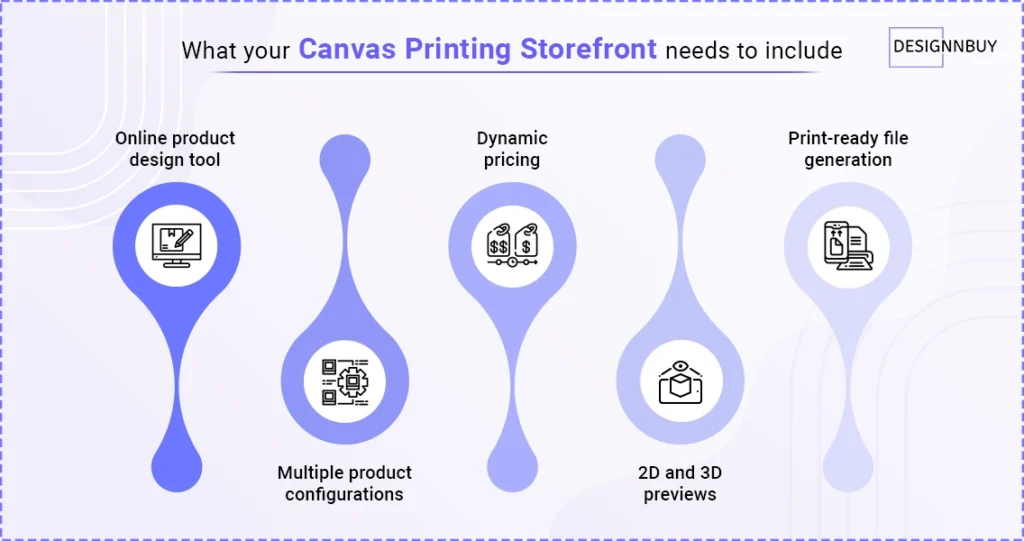
The most effective way to sell custom canvas prints online is through a web-to-print storefront. This type of storefront lets customers upload photos, choose sizes and finishes, preview their design in real time, and place orders without manual intervention from your team.
Here’s what your storefront needs to include:
Online product design tool: Customers should be able to upload images, add text, choose layouts, and see a live preview of their canvas before ordering.
Multiple product configurations: Offer different canvas sizes (8×10 to 40×60 and larger), wrap styles (gallery, mirror, color), frame options, and multi-panel layouts.
Dynamic pricing: Prices should update automatically based on size, material, quantity, and finishing options selected by the customer.
2D and 3D previews: Showing customers exactly what their finished canvas will look like, especially with a 3D product configurator, dramatically reduces returns and increases conversion.
Print-ready file generation: The system should automatically apply bleed, cut marks, and color profiles so files go straight to production without manual prep.
At DesignNBuy, we see this pattern across hundreds of print businesses. The ones that grow fastest are the ones that automate the design-to-production workflow. Our canvas printing software handles exactly this, from the customer’s first click to a production-ready file, without your team touching the order.
The storefront integrates with platforms like Shopify, WooCommerce, and BigCommerce, so you don’t need to rebuild your existing e-commerce setup. You can learn more in our guide on starting a photo printing business.
Want a Canvas Storefront Built for Your Brand?
Step 4: Choose the Right Equipment and Materials
For in-house canvas printing, you need a wide-format inkjet printer (such as an Epson SureColor or Canon imagePROGRAF), canvas rolls, stretcher bars, a staple gun, and a canvas stretching tool. Material quality directly impacts customer satisfaction and repeat orders.
Essential Equipment List
Wide-format inkjet printer: 24 inches to 44 inches in width. Budget $1,500 to $8,000 depending on brand and print quality. See our list of the best large format printers for recommendations.
Canvas rolls: Polyester-cotton blend or 100% cotton. Matte and satin finishes are most popular.
Stretcher bars: Wood or aluminum. Stock multiple sizes or invest in a bar-cutting system for custom sizes.
Stretching tools: Canvas pliers, staple gun, and corner folding tools.
Protective coating: UV-resistant spray or laminate to protect prints from fading and moisture.
Packaging: Corner protectors, cardboard boxes, and branded packaging materials.
Quick tip: Don’t skimp on canvas material quality. The difference between a $0.50 per square foot canvas and a $1.50 per square foot canvas is immediately visible to customers, and it’s the single biggest factor in reviews and repeat purchases.
For more on large-format product opportunities, check out our guide on high-profit large format printing products.
Step 5: Offer a Wide Range of Customization Options
Offering extensive customization options is what separates a profitable canvas printing business from a commodity one. This includes multiple sizes, wrap styles, frame choices, multi-panel layouts, and text overlays. Customization drives higher average order values and stronger customer loyalty.
Here are the customization options that perform best:
Canvas sizes: From small (8×10) to oversized (40×60 and beyond). Offering custom dimensions is a premium differentiator.
Wrap styles: Gallery wrap (image extends around edges), mirror wrap (edges reflect the image), color wrap (solid border color), and white wrap.
Frame options: Floating frames, traditional frames, and frameless options.
Multi-panel sets: Triptych, diptych, and custom multi-panel arrangements for large wall spaces.
Text and design overlays: Names, dates, quotes, and graphic elements customers can add to their photos.
Filters and effects: Black and white, sepia, pop art, watercolor, and other artistic effects.
Multi-side design: Customers can design on the front face and all four sides of the canvas for a fully customized look.
The more options you offer, the higher your average order value climbs. We’ve seen print businesses using DesignNBuy’s product configurator increase AOV by 30% to 45% simply by adding frame upsells and multi-panel options to their canvas product pages.
Photo Product Printers Worldwide Already Run on This Setup
Photo printers across Denmark (DezignPrint), Malaysia (PrintLab), New Zealand (ReproGraphics), and the Netherlands (FunGifts) built their custom photo product storefronts on DesignNBuy’s All-In-One Designer. Each one needed the same thing: customers designing, previewing, and ordering custom photo products without the printer touching every file manually. It’s the exact workflow that powers canvas printing storefronts on our platform today.
👉 Read the full success story
Step 6: Market Your Canvas Printing Business Effectively
The most effective marketing channels for a canvas printing business are social media (especially Instagram and Pinterest), SEO-optimized content, email marketing for repeat customers, and paid advertising targeting gift-giving occasions and home décor buyers.
A) Social Media Marketing
Canvas prints are inherently visual products, which makes Instagram, Pinterest, and TikTok your highest-ROI organic channels. Share customer photos (with permission), behind-the-scenes production content, before-and-after room mockups, and seasonal gift guides.
B) Search Engine Optimization (SEO + AEO / GEO)
Target long-tail keywords like “custom canvas prints from photos,” “personalized pet portrait canvas,” and “large canvas wall art.” Create product category pages optimized for each niche you serve.
C) Email Marketing
Canvas prints have strong repeat purchase potential. Birthdays, anniversaries, holidays, and home moves all trigger new orders. Build an email list from day one and send seasonal campaigns with personalized recommendations.
D) Paid Advertising
Facebook and Instagram ads targeting home décor enthusiasts, new homeowners, and gift shoppers consistently deliver strong ROAS for canvas print businesses. Use carousel ads showing different room settings with your canvas products.
E) Niche Targeting
The most profitable canvas printing businesses don’t try to sell everything to everyone. They pick a niche and dominate it. For businesses serving commercial spaces or interior décor clients, presenting custom canvas concepts with an interior design proposal template can strengthen your pitch and help win higher-value projects. Top-performing niches in 2026 include:
Pet portraits
Family and wedding photos
Motivational and inspirational quotes
Landscape and travel photography
Corporate branded wall art
Kids’ room and nursery art
Step 7: Automate Your Workflow with a Web-to-Print Technology
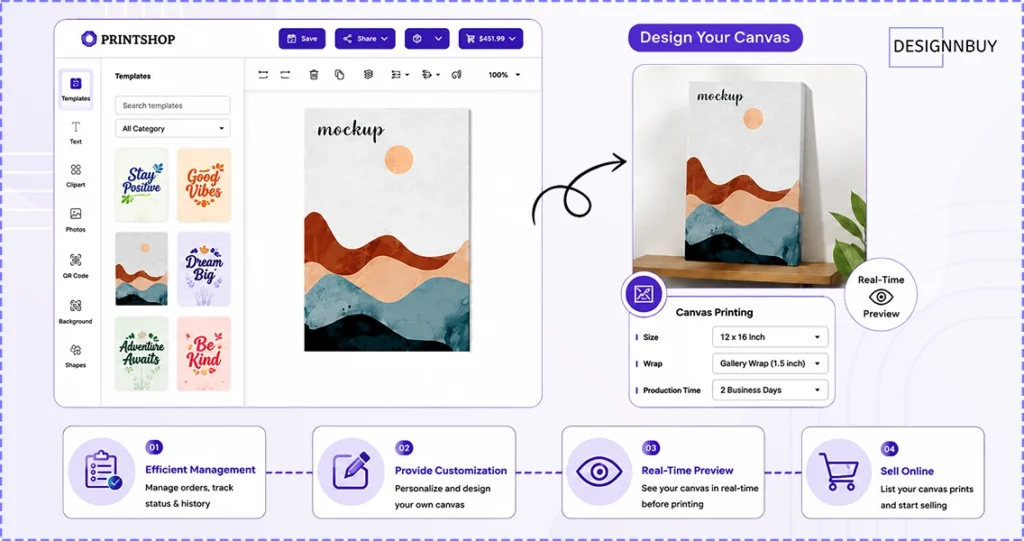
Web-to-print software automates the entire canvas printing workflow, from customer design and ordering to file preparation and production. This is what eliminates the manual bottlenecks that limit growth and create errors as you scale.
Here’s the thing most new canvas printing businesses get wrong: they focus on the printer and forget about the workflow. But as order volume grows, the bottleneck is never the printer. It’s the manual steps between the customer’s order and the production queue, the file prep, the resolution checks, the pricing calculations, the back-and-forth with customers about how their canvas will actually look.
A web-to-print platform built for canvas printing should handle all of it in one system:
Customer-facing design tool (DesignO): Full editor, quick editor, and file upload options. Customers design with photo uploads, text overlays, templates, filters, and multi-side design, all with real-time 2D and 3D previews.
Automated preflight: Every file is checked for resolution, bleed, and color profile issues before it enters production. No manual file prep.
AI image enhancement: Low-resolution customer uploads are automatically improved before production, reducing the number of orders that get flagged back.
Dynamic, rule-based pricing: Prices update in real time based on size, material, quantity, and finishing options.
Job management and tracking: Every order gets a job with barcode tracking through prepress, print, and dispatch.
E-commerce integration: Works natively with Shopify, WooCommerce, Magento, and BigCommerce, so you don’t rebuild your existing store.
B2B and B2C storefronts: Run a public-facing retail store and dedicated corporate portals from the same platform.
This is the architecture behind DesignNBuy, which has powered web-to-print businesses across 60+ countries for over 15 years. One of our clients, a photo product printer in the US, reduced order processing time by over 50% after implementing this workflow. The design tool handled customer uploads, the preflight system caught resolution issues automatically, and the production team received print-ready files without manual prep.
Want to see it in action? Get a Free Demo and we’ll walk you through how it works for your specific business.
Whether you’re launching your first canvas store or adding canvas to an existing print catalog, the right software stack determines whether you can scale past your founder-driven order volume.
If you’re exploring how to set up a print business from scratch, our guide on starting a printing business from home covers the full process.
Where Canvas Printing Is Headed in 2026 and Beyond
The canvas printing business is one of the most accessible and profitable segments in the print industry right now, and it’s being shaped by four forces every new printer should plan around:
AI-powered design tools: AI text generators and AI image enhancement tools are making it easier for customers to create professional-looking canvas designs without any design skills. This lowers the barrier to purchase and increases conversion rates.
Sustainability: Eco-friendly canvas materials, water-based inks, and sustainable packaging are becoming purchase decision factors, especially for younger buyers.
Mobile-first ordering: Over 60% of canvas print orders now originate from mobile devices. Your design tool and storefront must work flawlessly on phones and tablets.
AI search and conversational commerce: Buyers are increasingly discovering canvas print products through AI-powered search tools like ChatGPT shopping and Google AI Overviews. Structured product descriptions and clear FAQ content help your store get cited in these AI responses.
Corporate and B2B canvas printing: Offices, hotels, restaurants, and retail spaces are driving demand for branded and custom wall art at scale, creating a lucrative B2B channel for canvas printers.
With a global market projected to reach USD 123.4 billion by 2035 and consumer demand for personalized products continuing to climb, there’s never been a better time to start. The businesses that win in this space will be the ones that combine quality printing with a seamless online customization experience, picking a niche, automating their workflow, and meeting customers where they actually shop (increasingly, that’s AI search and mobile).
Frequently Asked Questions
Ready to Launch Your Canvas Printing Store?
Abhishek Agarwal
Co-founder/CMO, DesignNBuy
Abhishek Agarwal (Co-founder/CMO, DesignNBuy) has 15+ years of IT & web-to-print experience. He specializes in sales, marketing, and strategic business growth, delivering innovative solutions to global printers and mentoring teams.
All Posts

Trusted by 2000+ Print Businesses
Ready to See It in Action?
Explore our print shop platform at your convenience. Request a demo URL to experience the storefront, design tool, pricing, and much more.