Blog article content
Collaborative product personalization means more than one person can create, share, review and edit a product design before it's ordered. In DesignO, a sales rep can send a client a product mockup, a marketing team can review a concept together, and a customer can get a friend's opinion on a gift. DesignO 2.8 adds artwork version history and share-link approvals, so every change and sign-off stays attached to the order.
Here's something most print businesses miss: a lot of orders don't start at the checkout page.
They start with a conversation. A sales rep pitching packaging to a brand. A marketing manager sketching a promo idea for the team. A customer designing a mug for their mom and wanting a second opinion before they pay.
And in every one of those cases, the design ends up bouncing around in email, WhatsApp and screenshots.
We see this constantly with the print businesses we work with. The editor isn't the problem. The problem is that the moment more than one person gets involved, the design leaves the platform and the chaos begins.
In this guide, I'll show you how DesignO keeps that collaboration inside one workflow, from the first mockup to approved artwork, across three very different users.
Let's get into it.
Product Mockups: From an Idea to a Client-Ready Concept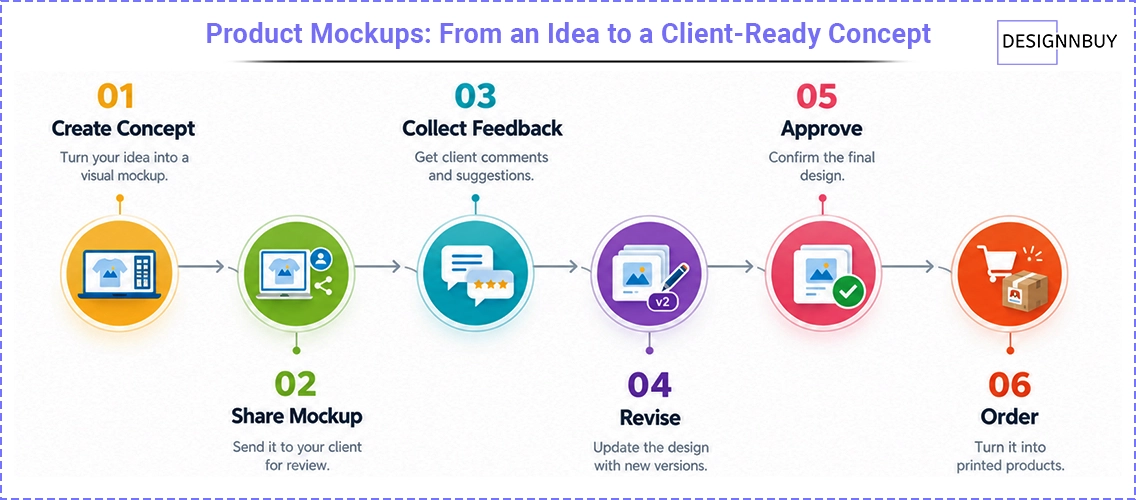
For many print businesses, the first step toward an order is a conversation, not a cart.
A sales rep might be discussing packaging, signage, promotional merchandise, apparel or displays with a client. Instead of describing the idea in words or sending static references, the rep builds the product concept in the DesignO online designer and uses it as a visual mockup.
Then they share it with the client for review.
Now, here's where it gets interesting. If the client wants changes, the artwork moves to a new version instead of overwriting the last one. DesignO 2.8 keeps every artwork version and logs every upload, edit and approval.
So the journey looks like this:
Create concept → Share mockup → Collect feedback → Revise → Approve → Order
The mockup stops being a side activity. It becomes the first step of the order.
Use Case 1: Sales Teams Create and Share Product Concepts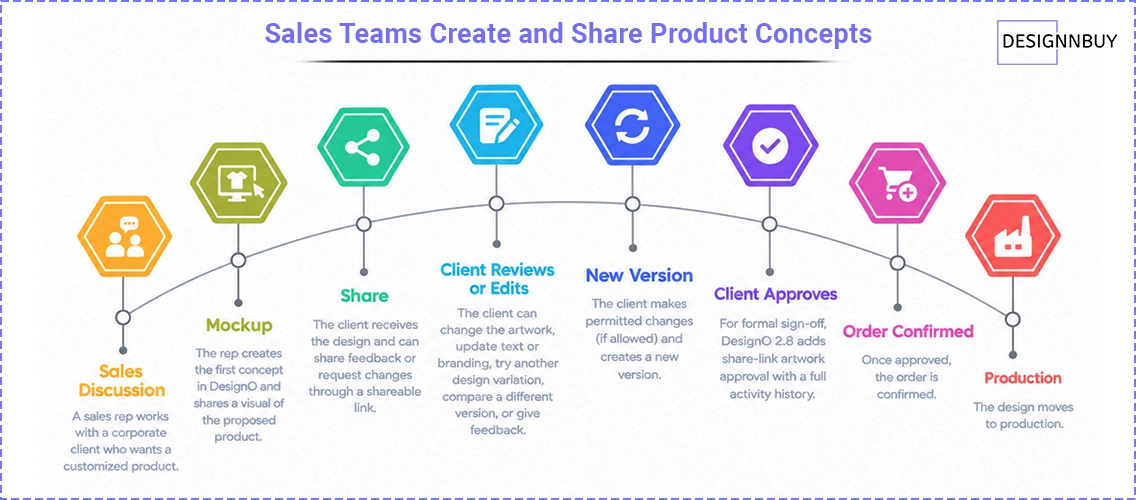
Picture a sales rep working with a corporate client who wants a customized product.
The rep creates the first concept in DesignO and shares a visual of the proposed product. The client then wants to:
Change the artwork
Update text or branding
Try another design variation
Compare a different version
Give feedback before approving
DesignO's shareable designs come with two access levels. The recipient can either view and comment, or edit the design, depending on what the rep allows.
Why does that matter?
Because the client doesn't have to wait for your creative team to redo every small tweak. They can make permitted changes themselves, and your team only steps in where it's needed.
For clients who need a formal sign-off, DesignO 2.8 adds share-link artwork approval with a full activity history.
Sales discussion → Mockup → Share → Client reviews or edits → New version → Client approves → Order confirmed → Production
The result: sales reps get a visual way to sell ideas, and every change on the way to "yes" is on record.
Use Case 2: Business Users Build Concepts With Their Team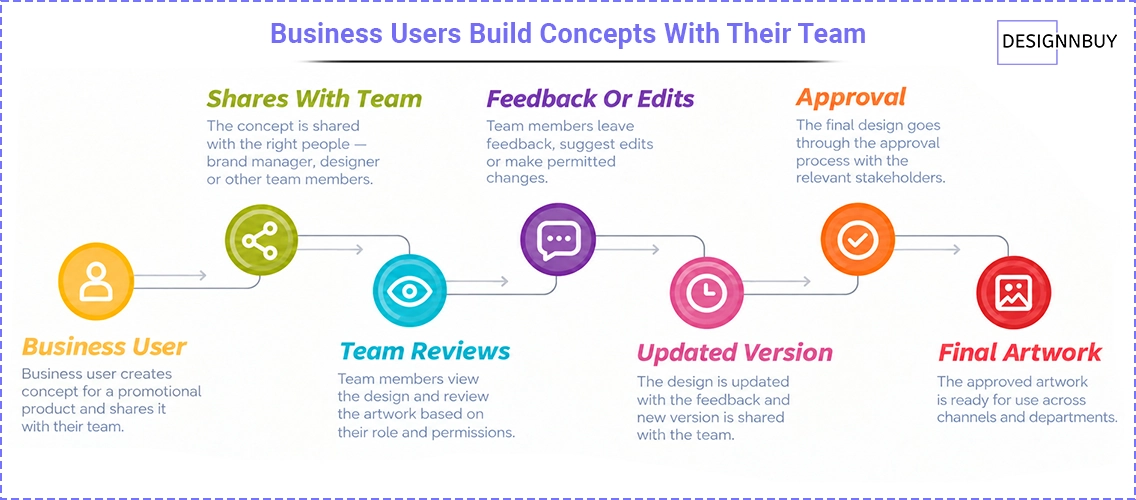
The same capability works just as well inside a company.
Say a marketing manager creates a promotional product concept, and a brand manager or designer needs to review it. Instead of emailing static files back and forth, they share the design with the right people.
Depending on permissions, team members can:
View the design
Review the artwork
Leave feedback
Make permitted edits
Check updated versions
Take part in the approval
Let me show you why that's useful for larger organizations.
DesignO also has profile-level controls for digital asset visibility. You can decide whether a user sees all templates, artworks, libraries and products, or only the ones they created. So an agency or a multi-department brand can keep creative assets organized without everyone seeing everything.
This is the same setup brand teams use to keep branding consistent across departments.
Business user creates concept → Shares with team → Team reviews → Feedback or edits → Updated version → Approval → Final artwork
The concept gets built together instead of by one person working alone.
How Ribbons Galore does it:
Ribbons Galore sells custom award ribbons and sashes to schools, sports clubs and corporate events, where one order often needs sign-off from several people. With DesignO's save and share, buyers send a design link around internally and bring the approved version straight into the order, while Ribbons Galore's team can edit designs on placed orders without starting over.
Use Case 3: Customers Personalize Products Together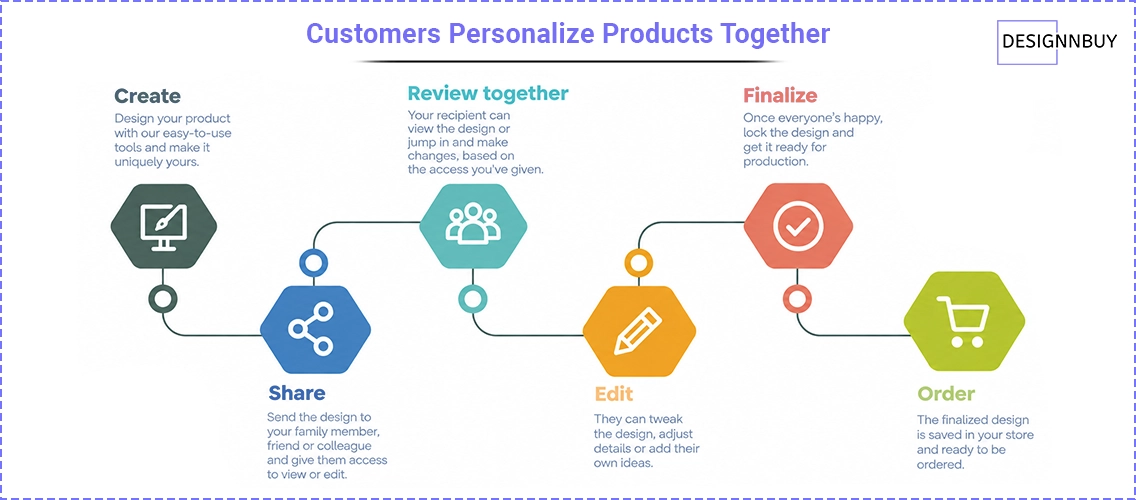
Collaboration isn't only for B2B and sales workflows.
Think about a customer personalizing a product for a family member, friend or colleague. They've made the design, but before ordering, they want the other person to see it:
"I made this for you. Have a look and tell me if you'd like anything changed."
They share the design. Depending on the access they give, the recipient can just look at it or jump in and edit.
Here's the kicker for you as the printer: that design stays in your store the whole time. It doesn't turn into a screenshot on someone's phone that never comes back. That matters, because customers often abandon designs before they add to cart, and a second opinion is often exactly what they're waiting on.
Create → Share → Review together → Edit → Finalize → Order
Personalization stops being a one-person job. The people the product is actually for get to be part of making it.
One Platform, Three Kinds of Collaboration
A design can start as a concept, become a personalized product, go through review, and end up as approved production artwork, all on the same platform.
Audience | Primary use case | Who collaborates |
|---|---|---|
Sales team | Create product mockups for clients | Client reviews or edits |
Business user | Create and share product concepts | Team reviews or edits |
End customer | Personalize a product | Family or friends review or edit |
The goal isn't just to hand someone a design editor. It's to give them a workflow where people can create, share, review, revise and approve artwork together.
Artwork Versioning Keeps Collaboration Organized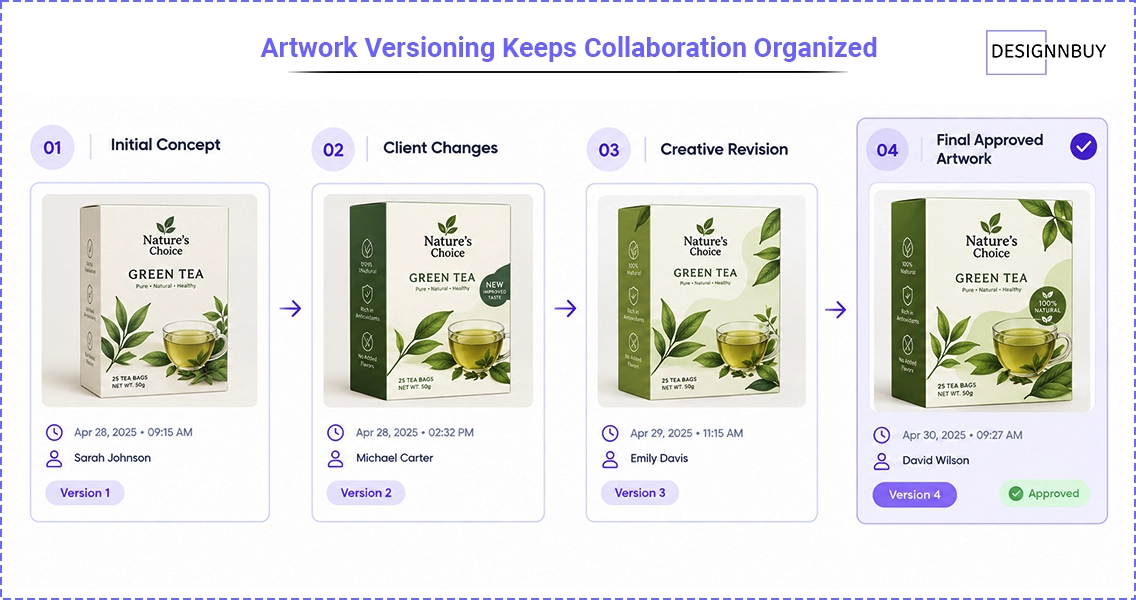
Collaboration gets messy fast when a design goes through several rounds of changes.
DesignO 2.8 saves a snapshot of each artwork version instead of overwriting the previous one. Every action is logged with a timestamp and the name of the person who made it.
So you get a clear record of how the artwork evolved:
Version 1: Initial concept
Version 2: Client requested changes
Version 3: Creative team revised the artwork
Version 4: Final approved artwork
When five people touch the same design, nobody has to ask "which one is the latest?" again.
Approval Becomes Part of the Order
Here's the other big shift: approval moves closer to the order itself.
With DesignO 2.8, customers or admins can review and approve artwork through a share link. You can also upload PDF artwork, including multi-page PDFs, and the order keeps a full activity history.
So approval is no longer a separate email thread disconnected from the artwork. It's built into your print order approval workflow.
If approvals are currently your bottleneck, we've written about why print approval workflows slow shops down and how to fix them.
Want to see approvals and proofing automated end to end? Watch the automated artwork proofing webinar →
Why This Matters for Print Businesses
The value goes well beyond good-looking mockups.
Collaborative personalization helps you:
Pitch ideas visually to prospects and clients
Make design discussions interactive instead of one-way
Cut artwork back-and-forth by letting people edit within limits
Keep every version organized in one history
Control who can view or edit each design
Build approval into the order instead of chasing sign-offs by email
Keep a full record of artwork changes and approvals
Fast recap: fewer emails, fewer "wrong version" mistakes, and faster approvals.
See what fewer revision rounds are worth to your shop. Try the web-to-print ROI calculator →
From Product Idea to Final Artwork
A sales rep, a business user and an end customer have very different reasons for designing a product.
But they all want the same thing: "I want to see the product, share the idea, get feedback, make changes, and feel confident about the final design before it's produced."
That's where DesignO's mockup and collaborative personalization capabilities come together.
Create the concept.
Share the design.
Collaborate on the artwork.
Create and review versions.
Get approval.
Send the approved design to production.
Whether you're winning a client, building an internal concept or helping a customer design a gift with family, DesignO gives you one place where ideas get created, shared, revised and approved before anything is printed.
Product personalization doesn't have to be a single design step. It can be a collaborative product experience.
Want to see shared designs and approvals running on your own products?
Book a Personalized Demo CallFrequently Asked Questions

Abhishek Agarwal
Co-founder/CMO, DesignNBuy
Abhishek Agarwal (Co-founder/CMO, DesignNBuy) has 15+ years of IT & web-to-print experience. He specializes in sales, marketing, and strategic business growth, delivering innovative solutions to global printers and mentoring teams.
All PostsRelated Posts

DesignO: Build a Custom Uniform Ordering Experience for Sports, Workwear & Healthcare
The Winning Tech Stack for Print on Demand Businesses: Shopify + DesignO + Printful (2026 Guide)