Blog article content
A custom uniform ordering platform lets sports teams, companies and hospitals configure, personalize, approve and reorder uniforms online instead of over email. For print and apparel businesses, that turns one-off uniform jobs into repeat programs. DesignO 2.8 adds the two pieces that matter most here: 3D preview with material choices, and artwork versioning with link-based approvals.
If you sell uniforms, you already know the design is rarely the hard part.
The hard part is everything around it. The logo that arrives as a blurry JPEG. The third round of changes. The "which version did we approve?" email. And the same customer coming back six months later asking for "the same shirts as last time, plus 15 more."
We see this pattern across the apparel and merchandise printers we work with. The work isn't difficult. It's just repetitive, manual and spread across too many inboxes.
In this guide, I'll show you how uniform suppliers are moving that whole process online, from customization and artwork approval to a cleaner handoff to production, and where DesignO fits in.
Let's get into it.
Why Custom Uniforms Are a Bigger Opportunity Than They Look
Uniforms aren't just "a logo on a shirt" anymore.
Sports teams, businesses, hospitals, schools and franchises all need uniforms with multiple styles, sizes, colors, personalization options, artwork approvals and repeat orders.
And the markets behind them are growing:
Workwear: valued at about $19.2 billion in 2025, projected to reach about $28.1 billion by 2033 (4.9% CAGR). [Add no-follow link to source]
Sportswear: about $399.4 billion in 2025, projected to reach about $890.4 billion by 2033 (10.7% CAGR), according to Grand View Research (no-follow).
Medical uniforms: about $45.61 billion in 2025, projected to reach $112.58 billion by 2034, according to Fortune Business Insights (no-follow).
Quick note: these aren't estimates of the uniform-builder software market. They're the markets where customized uniforms and workwear are sold.
Here's the short answer on what that means for you: the demand is there. The opportunity is making those products easier to buy. And increasingly, that means moving customization and ordering online.
Why Uniform Orders Get Messy
Think about how a typical uniform order works today.
A customer sends a logo.
Someone creates a design.
The customer asks for a change.
Another version goes out.
Someone approves it.
Production prepares the artwork.
A few months later, the customer asks for the same uniform for a new group of employees or players.
For a handful of orders, that's manageable.
At scale, it becomes a lot of manual work.
Now, here's where it gets interesting. A digital custom uniform builder lets your customers take part in the design and ordering process themselves. Instead of starting from scratch every time, you set up products, templates, customization options and workflows once, and repeat orders get much easier.
That's exactly where DesignO comes in.
What DesignO 2.8 Brings to Custom Uniform Businesses
We didn't build these as "uniform features." We built them for any product with layers, materials and multiple approvers, and uniforms happen to be one of the clearest fits.
Two capabilities matter most here.
3D Preview + Materials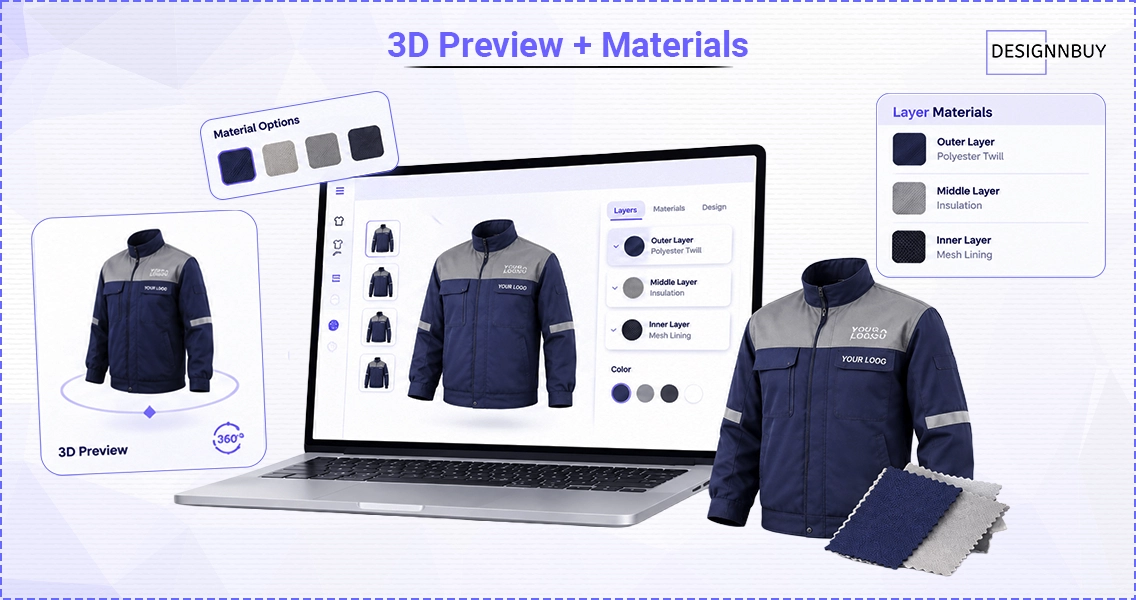
Uniforms involve more than picking a color. Depending on the product, customers may need to configure different layers, materials or product elements.
DesignO 2.8 lets you define material choices for each configured product layer. Your customers pick materials inside the design experience and see a 3D preview for layered products before they order.
Why does that matter?
Because customers want answers to questions like:
What will the final product look like?
Where will the logo sit?
What does this material actually look like?
How do all the elements work together?
A 3D preview answers those before the order is placed, not after the box arrives. The goal is simple: close the gap between what the customer imagines and what your production team has to produce.
Artwork Versioning & Approval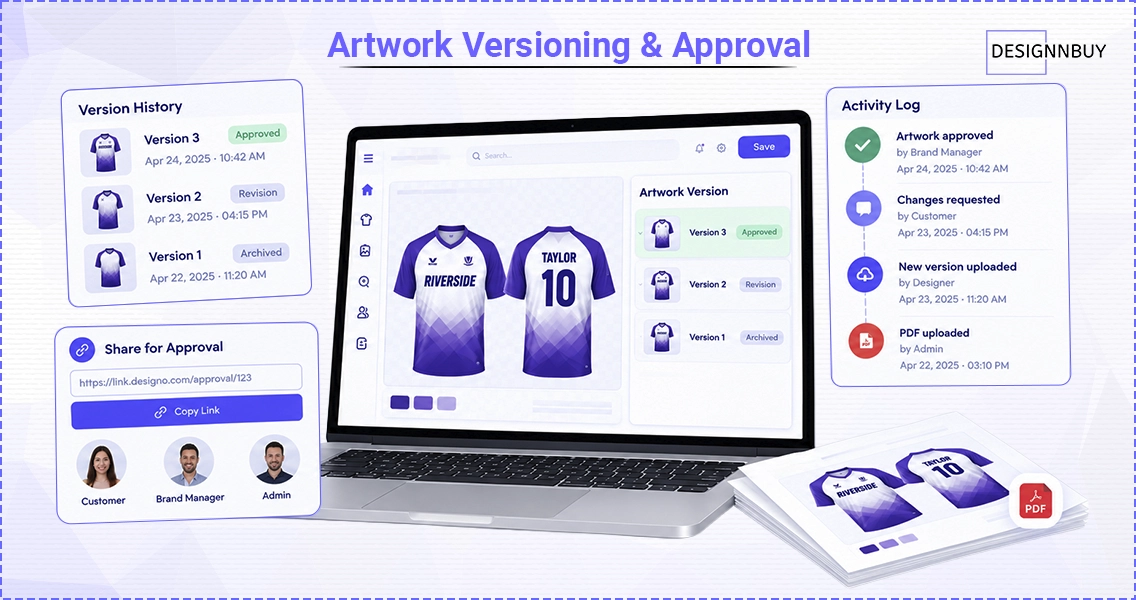
Uniform orders usually involve more than one person.
A team manager creates the design. A brand manager needs to sign off. The customer asks for changes. And production needs to know which version is the approved one.
DesignO 2.8 adds:
Artwork version tracking
PDF upload
Customer and admin approval through a share link
An activity history for every artwork action
So approvals become part of the order workflow instead of living in a separate chain of emails.
This works whether the customer designs in the online editor or works with your sales or design team first. Either way, every version and every approval sits in one place.
Want to see how printers automate proofing end to end? Watch the automated artwork proofing webinar →
How Uniform Suppliers Use DesignO
The technology gets more interesting when you look at real businesses. Let me break it down by segment.
1. Sports Uniforms: Give Teams a Better Way to Order
Sports teams are a natural fit for a custom sports jersey builder.
A team may need:
Custom jerseys
Player names and numbers
Team logos
Multiple color combinations
Different sizes
Different products for players, coaches and staff
Repeat orders every season
Instead of the team manager emailing every detail, they start from a predefined product or template, customize what's allowed, review the design and move to ordering.
But here's the kicker: the real win is repeatability. A team that orders once comes back every season. A league has multiple teams. A club has age groups and divisions. A good uniform builder turns all of those one-off orders into a structured digital relationship.
2. Workwear: Turn One Customer Into a Long-Term Program
Workwear can be even better business, because companies need uniforms again and again.
Think about:
Employee uniforms and branded shirts
Jackets and safety apparel
Hospitality and service staff clothing
Corporate and franchise uniforms
The first order might be for 20 employees. Later it's 100. Then come new hires, replacements, new locations and updated branding.
Custom workwear design software helps you move from one-off jobs to an ongoing ordering relationship. The customer gets the same digital experience every time, and you stop rebuilding the process from zero. DesignO 2.8's configurable products, materials and artwork workflows support a big part of that experience.
3. Hospital & Healthcare Uniforms: More Structured Customization
Healthcare organizations have their own requirements. A hospital might need separate apparel for:
Doctors
Nurses
Technicians
Administrative staff
Laboratory teams
Support staff
Add branding, colors, personalization and repeat ordering, and things get complicated fast.
A structured hospital uniform customization workflow gives the organization a controlled set of approved products and designs. Instead of every department contacting the supplier separately, everyone orders from the same place. That's especially useful when the customer has multiple departments or locations.
4. B2B Uniform Ordering: The Bigger Opportunity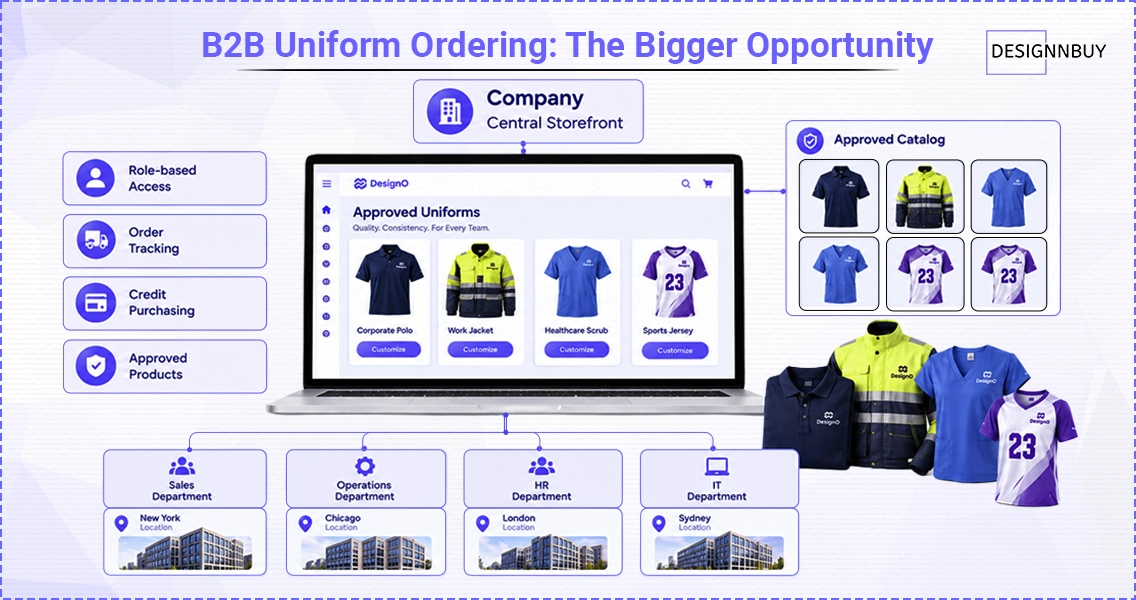
This is where customization meets B2B ordering.
DesignO's B2B capabilities include branded corporate storefronts, centrally configured products and templates, departments and locations, role-based access, order tracking and credit-based purchasing.
Quick example: imagine a company with 20 locations. Instead of managing 20 separate streams of email requests, you give them one ordering environment where employees or authorized users order from an approved catalog.
The organization gets more control.
Employees get a simpler way to order.
You get a scalable way to manage repeat business.
See how corporate buyers order from a branded portal. Watch the DesignO B2B ordering and brand portal webinar →
From "Approved" to Ready for Production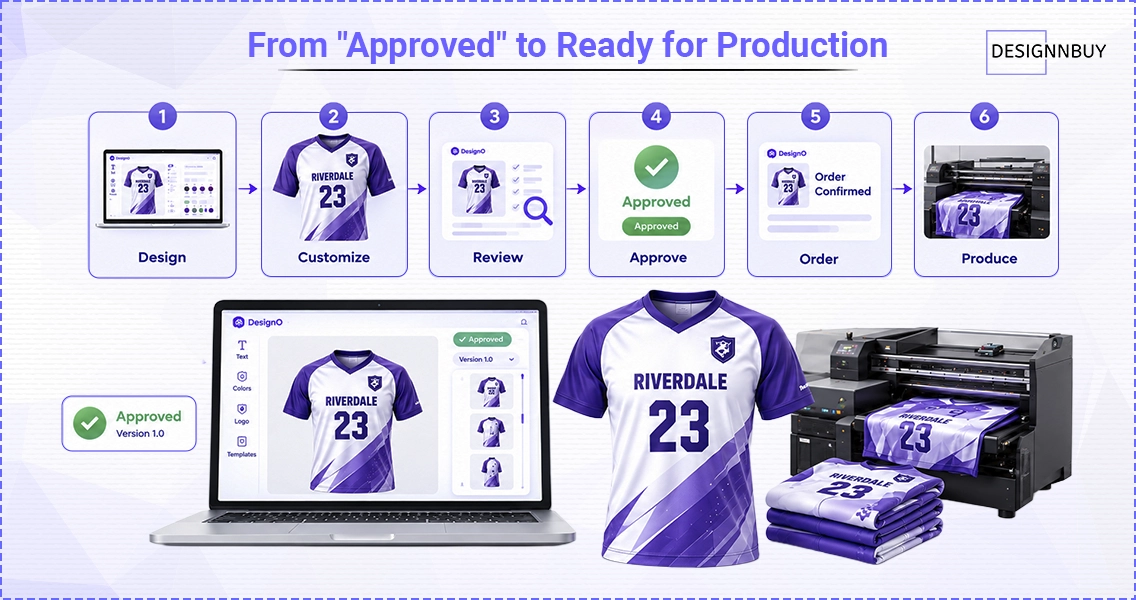
Getting a customer to approve a design is only half the job.
Production still needs to know exactly which artwork was approved and which version moves forward.
When artwork versions and approval activity live inside the platform, the handoff from customer approval to production gets much clearer. For a supplier handling lots of personalized orders, that means less confusion over outdated artwork, missing approvals or the wrong design going to print.
The flow looks like this:
Design → Customize → Review → Approve → Order → Produce
The fewer manual gaps between those stages, the easier it is to handle more customized orders without adding more people.
Why a Custom Uniform Builder Matters for Your Business
A uniform builder isn't just a design tool. Done well, it becomes part of how you sell.
It helps you:
Sell more configurable products. Customers personalize products themselves, without a salesperson configuring every order.
Cut repetitive communication. Structured design and approval workflows replace much of the email back-and-forth.
Create repeatable ordering. Once products and templates are set up, customers come back to a familiar experience.
Support B2B customers. Corporate buyers get controlled catalogs, departments, permissions and repeat ordering instead of a standard consumer checkout.
Manage approvals more easily. Version history and approval workflows keep stakeholder feedback organized.
Give customers confidence before they order. Visual previews and clear approvals show them exactly what they're buying.
Curious what fewer revision rounds and faster reorders are worth to you? Try the web-to-print ROI calculator →
The Bigger Picture: From Custom Products to Digital Uniform Programs
Here's the real shift.
The opportunity isn't selling one custom jersey or one branded work shirt online. It's building a digital uniform program.
For example:
A sports supplier gives each team its own ordering experience.
A workwear printer gives companies a catalog of approved employee apparel.
A healthcare apparel supplier organizes products by department and role.
A franchise supplier provides consistent branded products across multiple locations.
In every case, you move beyond "send us your artwork and we'll give you a quote." Your customer gets a digital experience built around how they actually buy uniforms.
That's what makes a custom uniform ordering platform more valuable than a simple online catalog.
The Future of Custom Uniform Ordering Is Digital
Uniforms have always been customized. What's changing is how that customization is managed.
Customers now expect to see products online, personalize them, review designs and order without depending on endless emails. At the same time, you need to control branding, manage artwork, handle repeat orders and keep a clean path from approved design to production.
That's a real opening for printers, apparel businesses, promotional product companies and uniform suppliers to rethink how they take orders.
DesignO gives you the foundation for that workflow, and DesignO 2.8 adds more flexibility around configurable products, materials, artwork approval and the design experience itself.
Fast recap: it's not just an online uniform designer. It's a more connected way to sell and manage customized uniforms at scale.
Build Your Custom Uniform Ordering Experience With DesignO
Whether you sell sports uniforms, corporate workwear, healthcare apparel or other customized products, the goal is the same: make ordering easier for your customers and your team.
With DesignO, you bring product customization, artwork workflows, B2B ordering and a customer-facing design experience into one connected web-to-print platform.
Frequently Asked Questions

Abhishek Agarwal
Co-founder/CMO, DesignNBuy
Abhishek Agarwal (Co-founder/CMO, DesignNBuy) has 15+ years of IT & web-to-print experience. He specializes in sales, marketing, and strategic business growth, delivering innovative solutions to global printers and mentoring teams.
All PostsRelated Posts

How Print Businesses Turn Product Mockups Into Approved Orders With Collaborative Personalization
The Winning Tech Stack for Print on Demand Businesses: Shopify + DesignO + Printful (2026 Guide)